The Association for Investment Management and Research, a world-wide, though North American dominated, organization of financial analysts, which became "The CFA Institute" in 2004.
A constant of passwordAccessType used within the user authentication and administration processes (e.g. editUserBox) to determine the user's authorization to use various features of HIMIPref™.
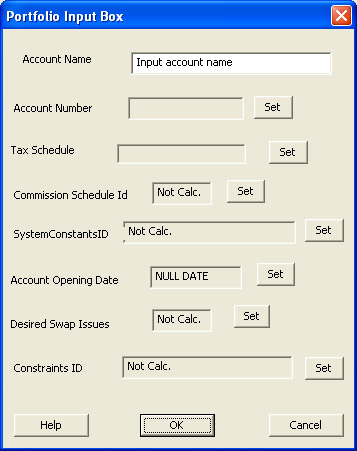
A field contained in a portfolioDataRecord which specifies the legal name of the account's owner. This is used in the preparation of reports, confirmations, etc. Any characters are allowable for input, up to a limit of ACCOUNT_NAME_LENGTH characters.
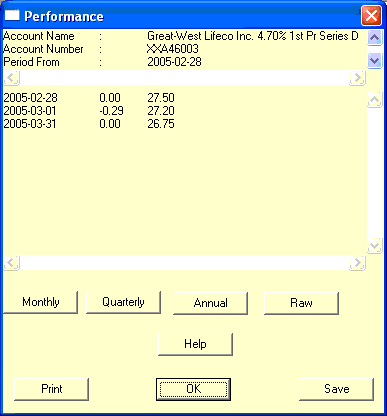
When individual securities are assigned an account (e.g. in the preparation of a performanceReport), the "accountName" is the longName of the instrument.
A field in the portfolioDataRecord which uniquely identifies a separate account - which may be an actual client account or a notional account used for research purposes. An "accountNumber" will have ACCOUNT_NUMBER_LENGTH characters.
Also a field in a holdingsDataRecord, serving to identify the portfolio owning the position signified by the record.
When individual securities are assigned an internal "accountNumber" (e.g. in the preparation of a performanceReport), these account numbers are "XX" followed by the securityCodes of the instruments.
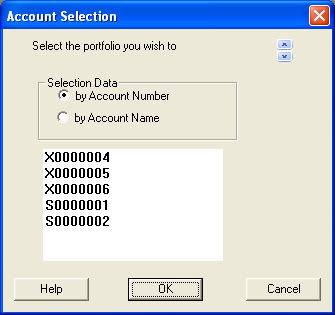
An input box which allows selection from any of the accounts listed in the portfolio table.
To select an account, simply highlight the desired element of the displayed list and click the "OK" button. To select no account, click the "Cancel" button.
The list of accounts can be formatted according to either accountName or accountNumber in accordance with the radio-button selected under the heading "Selection Data".
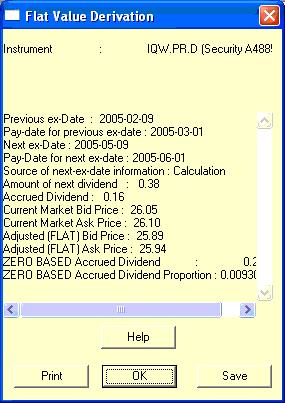
Dividends on preferred shares (and interest on preferred securities) do not accrue on a daily basis - the income is simply paid if, as and when declared. Never-the-less, there is sufficient regularity and certainty of these payments that the market price of these securities may be expected to follow a sawtooth pattern - the price rising until the ex-date and falling immediately to reflect the amount of income which has just become payable to the holders.
Hence, a calculation of "accrued dividends" can have some relevence, with the objective of stripping this effect from the quoted price to arrive at, for instance, the Current Bid (FlatValue)
The calculation proceeds with the following steps:
The dividend record with the ex-date immediately prior to the calculation date is obtained
The dividend record with the ex-date immediately following the calculation date is obtained (by estimation, if necessary)
The pay-date corresponding to the prior ex-date is then obtained
The "accrued dividend" is then the amount of the next dividend, times the fraction of the period elapsed from the prior payDate.
Note that this value for "accrued dividends" may be negative, if the calculation date is prior to the payDate of the dividend record corresponding to the immediately prior ex-date.
The portfolio currently being examined by HIMIPref™. This may be changed via the "Set Portfolio as Active" selection on the portfolioListReportContextMenu|accountName context menu.
This term is applied to those issues which have a dividend rate that is adjustable by the issuer in a manner that does not lend itself to analysis by HIMIPref™. For example, the issue of Epcor Preferred Equity Inc. Cumulative Redeemable First Preferred Shares, Series 1 has terms defined in the prospectus whereby after October 1, 2007, the floatingRate option is dependent upon the five-year Government of Canada Yield. This is the only issue examined which has such terms - similar instruments are amenable to analysis as the floatingRate option is dependent upon the Canada Prime Rate and there exists a sufficient number of these instruments to form a homogeneous group upon which historical behaviour may be tested. Thus, "adjustableRate" preferred shares are marked with the PRICING_EXCLUDED_ADJUSTABLERATE flag in the pricingCode field of their instrumentDataRecord - at least until such time as sufficient data is available to allow some confidence in the results of historical analysis.
The adjusted cost base of a security position is the net amount of money paid to hold it and is usually reported on a per-share basis. When securities are held long only, then purchase amounts are added to the adjusted cost base and may change the per-share value, while when shares are sold they are each assumed to have cost an amount equal to the then-current adjusted cost base and a capital gain or loss reported on the difference between this figure and the actual receipt.
If the issue bought has a risk attribute for which the issuer concentration is controlled, the trade is examined to determine whether the purchase will result in the total weight of that issuer in the portfolio exceeding the value of the control. If so, the size of the trade is reduced accordingly.
In the issue method, if the parameter is set to a valid non-zero value, then the parameter will be raised, if necessary, to the inverse of the numberSwapSecuritiesDesired : that is, if the parameter is set to 1%, but only two securities are desired to be held, then the calculation will be performed with a maximum weight for that issuer of 50%.
This procedure is called by adjustForSectoralMaxWeights in the determination of trade size. It is called with a particular yield curverisk attribute - e.g., whether it is a retractible and/or floating rate issue. If this risk attribute is different for the issues bought and sold and the maximum/minimum weight of that component in the portfolio is defined, the weight of that component in the portfolio is determined. If the maximum/minimum weight of that attribute in the portfolio will be exceeded/undershot through execution of the trade, the trade size is reduced accordingly.
In the issue method, if the parameter is set to a valid non-zero value, then the parameter will be raised, if necessary, to the inverse of the numberSwapSecuritiesDesired : that is, if the "constraint parameter" is set to 1%, but only two securities are desired to be held, then the calculation will be performed with a maximum weight for that sector of 50%.
Components which are constrained and their constraint parameters are:
A procedure called during the calculation of trade size.
This procedure examines the weight of the purchased issue after execution of the putative trade. If this weight is less than effectiveMinWeight, the size of both the purchase and sale are reset to 0.
This is a fairly technical adjustment, called to ensure that rounding errors are not propogated to the solution. If the number of shares purchased is zero, the number sold is non-zero and there is a positive cash balance in the account, then the number of shares sold is re-set to zero.
A procedure called by calculateTradeSize during the calculation of tradeSize to ensure that indicated trades are reasonable in light of historical trading volumes.
If the product of maxDaysToTrade and volume - average is less than the size of the indicated trade (for either the purchase or sale), then the trade size is reduced accordingly.
A procedure called during the calculation of trade size.
If the sale indicated by the trade would leave the sold position with a weight in the portfolio of less than PARAMETER_PORTFOLIO_MINWEIGHT, then the sell size is adjusted upwards to sell the entire position.
The amount left to the investor after payment of taxes: if a dividend payment is $1.00 and the investor's marginalTaxRate for dividends is 32.9%, the after-tax value of the dividend is $0.671.
A field in an instrumentDataRecord that specifies the annual dividend that is to be paid on the instrument in accordance with the prospectus. In the case of floatingRateInstruments, this value is set to zero and equivalent calculations performed as necessary in accordance with information recorded in the instrument's instrumentFloatingRateDataRecord. In the case of fixedFloaters, the value is that of the fixed rate payable.
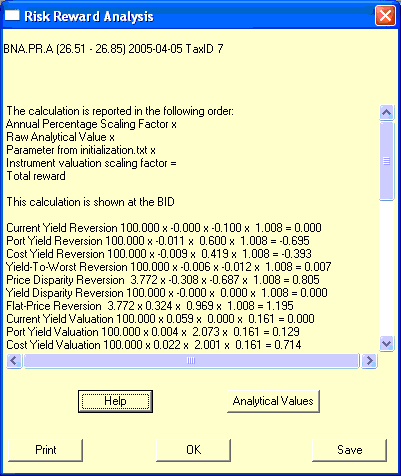
A scaling factor used in the calculation of rewardComponentsBid / rewardComponentsAsk to ensure that individual raw analytical values are treated as annual percentages, a convention utilized to
Ensure that there is some degree of physical meaning to the valuation, rather than these values being reported on an arbitrary scale, and
to ensure that there is only one set of optimized optimizable parameters, rather than an infinite set of values maintaining the same proportions.
(i) The "ask" represents the price at which at least 100 shares (a board lot) may be bought. Simulation methodology assumes that the value of shares which may be purchased at the day's closing "ask" is equal to the tradeable value of the issue.
The "ask" reported by the system and used in simulations is derived from exchange data according to the following methodology:
if the exchange reported an actual non-zero closing ask, then this value is used.
if the exchange did not report a ask, but reported a closing bid greater than $1, then the value used is $1 more than the bid.
if the exchange reported neither a bid nor an ask for the security at the close of business, then the value used is $0.50 more than the most recent close of the security.
The yieldToMaturity of the element of the optionCalculationList that is the lowest (scenarios which involve the exercise of retraction privileges excepted), when the calculations have been performed using the ask price.
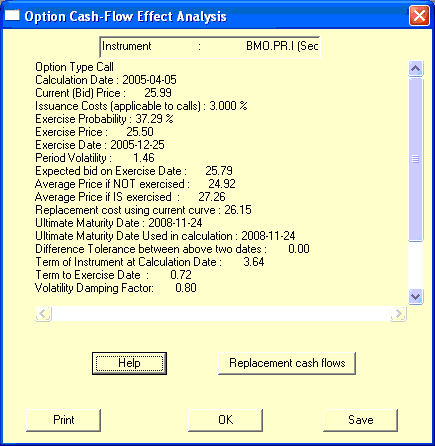
This is the mean average price under a normal distribution centered at the expectedBid, considering only that area of the curve for which the cumulative probability is greater than that indicated by the probable exercise of prior puts and less than that indicated by the probable exercise of prior calls.
In this calculation, the normal distribution is divided into 101 segments, each with a width of 0.05 standard deviations, where the standard deviation is set as being the period volatility. Each segment is then examined - if the segment is sufficiently high (in terms of cumulative probability) to assume that a prior put (or sufficiently low, for prior calls) has not been exercised, the midpoint of the segment is assumed to be the price of the entire segment and this price incorporated into the average weighted by the probability of the segment.
Note that this calculation implicitly makes the assumption that the deviation of market valuations from the expected value are monotonic - a Monte Carlo calculation has been deemed unnecessarily complex for analytical purposes.
A calculated value used in the cost method of option pricing and provides an indication of what the price of an instrument could be expected to be if an embedded option that is considered to be exercised were not to have been exercised - for example, if an issue were to have two equally possible prices, $24.50 and $25.50 and a retraction option exists with an exercise price of $25.00, we might then consider that the retraction will be exercised if the lower price would otherwise be effective (and not otherwise) and the "average price if exercised" will be $24.50.
The Bank of Canada is Canada's central bank, with responsibilities focussing on the goals of low and stable inflation, a safe and secure currency, financial stability and the efficient management of government funds and public debt. Further information is available on its website.
A "bankruptcy" occurs when a corporation is no longer able to meet its obligations and the creditors of the firm (including corporate financers, such as holders of preferred shares, in accordance with the terms of the prospectus) liquidate the firm's assets (or recapitalize the company) and make what recovery they can from the realized value. This is the most extreme example of a reorganization
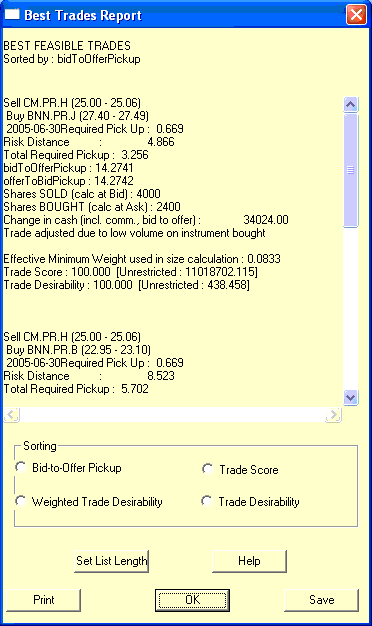
A dialog box accessible via any of the selections on the tradeMenu|Reports|BestTrades popup menu. It displays the best trades for which tradeFeasible is true referenced on the tradeReport, sorted as indicated by the actual selection. The user may specify the number of trades to be ranked on this report by clicking the "Set List Length" button.
(i) The bid represents the price at which at least 100 shares (a board lot) may be sold. Simulation methodology assumes that the value of shares which may be sold at the day's closing bid is equal to the tradeable value of the issue.
The bid reported by the system and used in simulations is derived from exchange data according to the following methodology:
if the exchange reported an actual non-zero closing bid, then this value is used.
if the exchange did not report a bid, but reported a closing ask greater than $1, then the value used is $1 less than the ask.
if the exchange reported neither a bid nor an ask for the security at the close of business, then the value used is $0.50 less than the most recent closing trade price of the security.
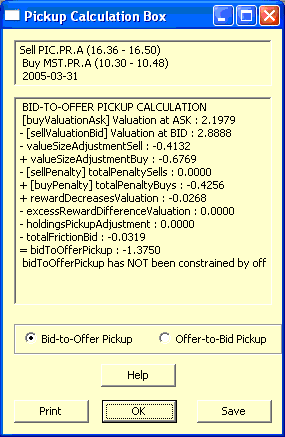
A calculated value, used in the calculation of tradeDesirability and tradeScore, calculated by comparing the valuations of the two instruments involved in the trade, valuing the instrument to be sold at the bid and the instrument to be purchased at the offer
The yieldToMaturity of the element of the optionCalculationList that is the lowest (scenarios which involve the exercise of retraction privileges excepted), when the calculations have been performed using the bid price.
A portfolio defined by the system when, for one reason or another (usually the unavailability of pricing information for an issue presumed to be held by the previously activePortfolio) computations are not otherwise feasible.
The "blankPortfolio" is initialized with the following values in its portfolioDataRecord:
A standardized number of shares, set by the relevent Exchange as part of their rules. On the Toronto Stock Exchange, it is defined as
A trading unit of shares. The board lot size of a security is determined by the previous day's close price. Close less than 10 cents: 1000 shares board lot. Close between 10 cents and $1.00: 500 shares board lot. Close $1.00 or higher: 100 shares board lot
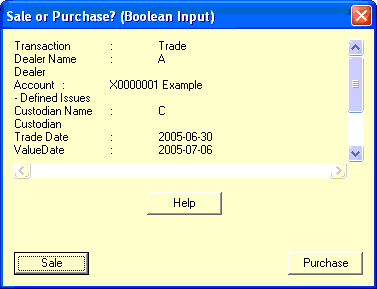
An input box that allows the user to answer the indicated question by clicking on either the "Yes" or "No" button.
Note that the captions of the buttons may vary by context; e.g., they will be labelled "Sale" and "Purchase" when the indicated question is "Is this trade a SALE?".
A calculated value used in the subsequent calculations of bidToOfferPickup. It is defined as
buyValuationAsk = totalRewardAsk [of the instrument bought]
This value seeks to give a single number reflecting the attractiveness of the instrument being bought at its ask price before accounting either for the portfolio's holdings of the security in question or for penaltyComponents .
CFA Charters are issued by AIMR. CFA stands for "Chartered Financial Analyst". The charter is awarded after the successful completion of three annual examinations (which are prepared for through home study) and relevent experience in the financial industry. The CFA Charter is usually regarded as being roughly equivalent to an MBA with a specialization in finance.
In the case of 1:1 conversion, this will be equal to the calculatedSellPrice; when the conversion ratio is not 1:1, the "calculatedBuyPrice" will be adjusted so that the total book value of the position is unchanged.
A calculated value based on the number of shares and the values stored on the appropriate commissionDataRecord. This number provides the total commission payable on a trade of the supplied number of shares and is calculated as:
In the issue method, when the parameter numberSwapSecuritiesDesired is 0 (i.e., the calculation is being performed for theoretical purposes), the result is 1.0 + the weight of the issue currently held.
The term "trade size" is shorthand for its two components: sellSize and buySize.
Note that some of the constraints limiting the proportion of investment in a particular sector may be over-ridden by the inverse of desiredSwapIssues if this value is defined.
A type of option which gives the holder the right, but not the obligation, to buy securities at a specified price at a specified time in the future. In the preferred share universe, most issues will have "calls" as embedded options, with the issuer having the right of exercise. An issue for which a "call" exists is referred to as "callable".
the average ... of the annual rates of interest announced from time to time by the [Canadian Schedule A] Banks as the reference rates then in effect for such day for determining interest rates on Canadian dollar commercial loans made to prime commercial borrowers in Canada
(the language has been taken from the prospectus for the Northern Telecom Limited Non-cumulative Redeemable Class A Preferred Shares Series 7, which currently (December, 2003) trade on the Toronto Stock Exchange as NTL.PR.G.
This rate is also defined and compiled by the Bank of Canada and reported on its website.
Securities regulation in Canada falls within the jurisdiction of the provinces or territories, rather than being a federal matter. As such, each province or territory has its own securities regulator. The Canadian Securities Administrators (CSA) is an "umbrella" organization, which is comprised of all provincial and territorial securities regulators and provides in essence, a "virtual" national securities regulator. One of the activities of the CSA is to provide investor education materials for distribution by member regulators.
One of the activities of the CSA is the maintenance of SEDAR.
A capital gain results when the net proceeds from a security sale (after directly related expenses) exceeds its adjusted cost base. Due to differing marginal tax rates, capital gains are generally the most desireable type of income to have.
Cash held in a demand account at a financial institution, or currency, or a financial instrument issued by a financially strong institution with a very short term and great liquidity in the market-place, so that it may readily be turned into an amount of cash known with great precision. An example would be Government of Canada Treasury bills with a term-to-maturity of three months or less.
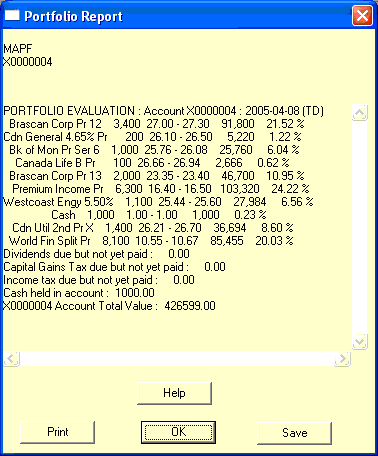
This value, when used specifically to refer to the cash position of a portfolio, is displayed by the portfolioReportBox.
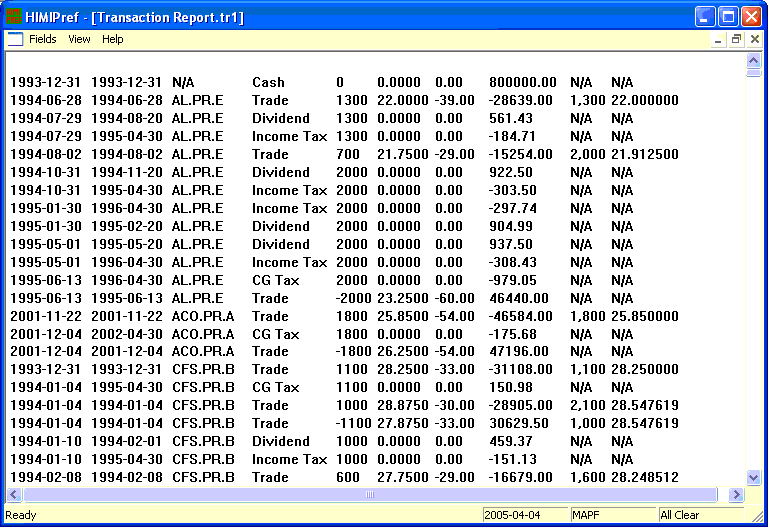
The total "cash and equivalents" holding of a portfolio tracked in detail by HIMIPref™ may be viewed on the transactionReport and is reported on the portfolioListReport.
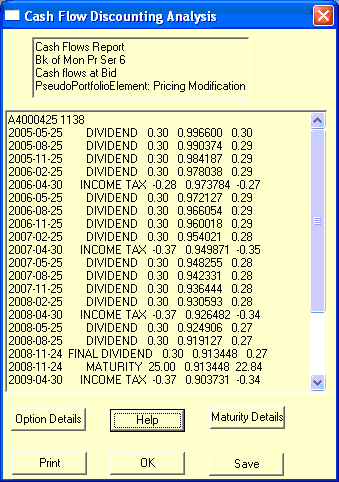
A flowType which indicates that the parent cashFlowEntry has been created to represent an adjustment to the first dividend payment, which will have been processed as CASHFLOW_DIVIDEND at the standard rate, but which may actually have a non-standard cashFlowAmount in accordance with the terms of the prospectus.
A flowType which indicates that the parent cashFlowEntry has been created to represent the last dividend payment of the series, which may therefore have a different cashFlowAmount than other elements of the series and a cashFlowDate not evenly spaced with the other elements.
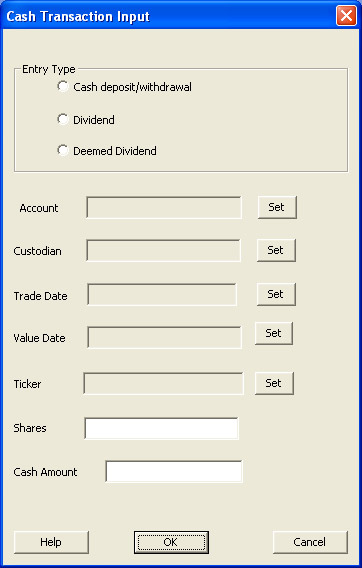
A dialog box accessible via the "Process Cash Entry" command of the mainMenu|Admin popup menu, which allows for the creation of a transactionDataRecord reflecting the following user inputs:
A term used to refer to the value of a particular holding in a portfolio. It is equal to the product of the two applicable fields on the holdingsDataRecord: if holdings is positive, it is holdings * bid; otherwise, it is holdings * ask.
Membership in this parameterClassType indicates that the parameter is representable by a real number (as opposed to an integral or character-based flag).
This scaling factor is calculated as the inverse of the sum of all parameters in this class - therefore, when the parameters in this class are multiplied by the scaling factor and then summed, the total is 1.0. This is a useful property when considering classRewardYieldBid / classRewardYieldAsk as this value will be the percentage expected return on the instrument as determined by a blended estimate of the yield of the instrument.
This class of parameters indicates that its members are optimizableParameters, and that a simulation involving a change to one or more of them will run relatively quickly as neither universeAverages nor instrumentAveragesRecord must be recalculated.
This class of parameters indicates that its members are optimizableParameters, but that a simulation involving a change to one or more of them will run relatively slowly as either universeAverages or instrumentAveragesRecord must be recalculated.
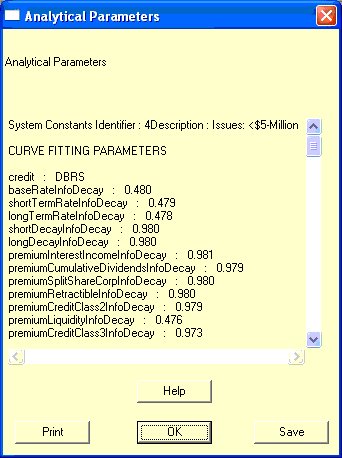
This class of optimizableParameters is designated for cosmetic purposes only. It indicates that the parameters so described, listed under the heading "PORTFOLIO PARAMETERS" in the analyticalParametersReportBox, are used to describe attributes of the specific portfolio for which the valuation is made, rather than reflecting intrinsic characteristics of the preferred share universe.
If the parameter is a member of the class CLASS_PARAMETER_CURVEAVERAGING and is a member of the class "CLASS_PARAMETER_REVERSION", it is reported under the heading "CURVE REVERSION PARAMETERS"
If the parameter is a member of the class CLASS_PARAMETER_INSTRUMENT_VALUATION and is a member of the class "CLASS_PARAMETER_REVERSION", it is reported under the heading "INSTRUMENT AVERAGING PARAMETERS [Reversion]"
If the parameter is a member of the class CLASS_PARAMETER_INSTRUMENTAVERAGING but not a member of the class "CLASS_PARAMETER_REVERSION", it is reported under the heading "INSTRUMENT AVERAGING PARAMETERS [Calculation]"
This class of parameters is designated for cosmetic purposes only. It indicates that the parameters so described, listed under the heading "SYSTEM PARAMETERS" in the analyticalParametersReportBox are best described as being fundamental constants used in the course of calculations throughout HIMIPref™. However, provision has been made for varying these parameters on an occasional basis.
This class of optimizableParameters is designated for cosmetic purposes only. It indicates that the parameters so described, listed under the heading "TRADING PARAMETERS" in the analyticalParametersReportBox have no effect on valuation, they are used in the process of trade determination only.
(i) The price of the last trade executed on the exchange on the day in question.
(ii) A field in a priceDataRecord recording the "close" according to the exchange for the specified securityCode and date. This datum is not routinely gathered - it is recorded only when the security has no bid and no ask reported.
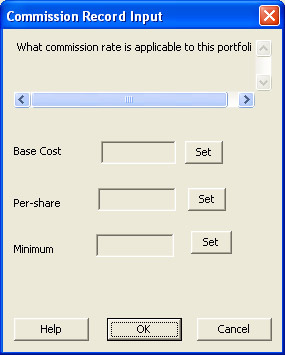
The basic charge for executing a trade, irrespective of quantity. For example, while a broker may charge institutional clients five cents per share, regardless of size, the custodian may charge $20 for every settlement, regardless of size. This $20 fee would be the "commission base" when preparing the commission data record.
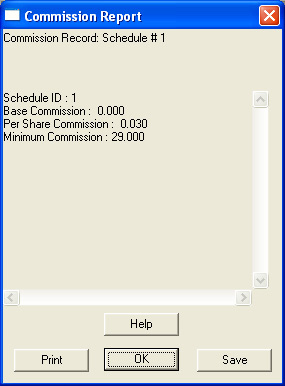
This field specifies the minimum commission payable in order to execute a trade. For example, discount brokers in Canada may charge three cents per share on trades, with a minimum of $29.00.
This field specifies an identifier for the record which may be used by other data records to refer to the commission record. Other records which key on this value include:
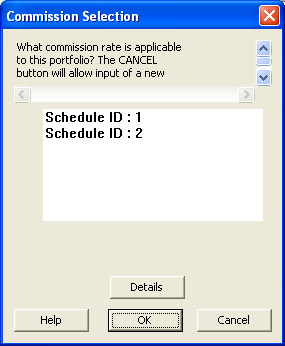
A dialog box accessible via the portfolioInputBox, which allows the selection of the commissionScheduleID applicable to the portfolio being defined. A central list box allows the highlighting of a single commissionScheduleID; clicking
A field in the editUserBox and passwordChangeBox that requires the user to retype the string input into the password field in order to confirm that there have been no typographical errors in the input.
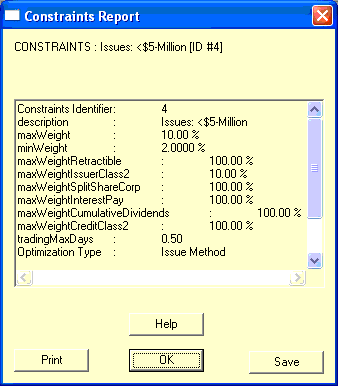
A constraint is an arbitrary constant imposed upon the system. While investigations may take place from time to time to check the reasonableness of the values, they are not considered to be optimizable parameters. Constraints are:
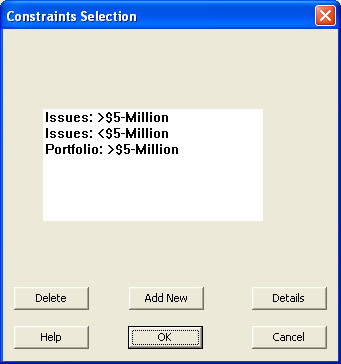
The description field of all constraintSpecificationRecords is displayed in a normal list box. The following operations may be performed through clicking the appropriate buttons:
Delete : attempts to delete the highlighted record. If this record is required as it is specified in an extant portfolioDataRecord, no action will be taken.
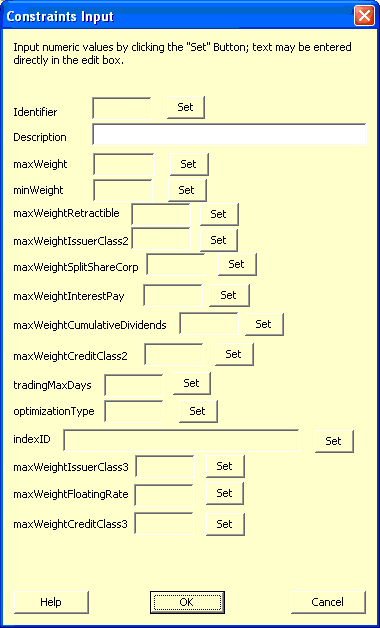
Add New : displays the constraintsInputBox for the creation of a new record.
This is an acronym for "Canadian Originated Preferred Securities", a term trademarked by Merrill Lynch to denote Preferred Securities. Such instruments pay interest income.
The "costAskDiscountingTable" is used for the determination of cost yield at the ask price and as the base for the curveAskTable. The cash flow entries in this table are computed in the following order:
The "costBidDiscountingTable" is used for the determination of cost yield at the bid price and as the base for the curveBidTable. The cash flow entries in this table are computed in the following order:
A calculated vector of (PSEUDO_PORTFOLIO_INDEX_MEMBERS-2) entries, used in subsequent calculations of pseudoModifiedDurationCost. It represents the differences in costBidYield between all but the highest and lowest priced elements of the pseudoList relative to their flanking members, so that the "costBidYieldDifference" corresponding to pseudoList[i] is
A technique of valuing embedded options which is the foundation for the cost method of instrument valuation.
Once the basic option calculation list has been calculated, each component of that list is assigned a value in accordance with the "cost method of option pricing" and this value incorporated into the projected cash flows of the instrument's costBidDiscountingTable and costAskDiscountingTable.
The complete set of options available to the issuer and the investor is considered and a value assigned to each option. These option values are incorporated into an over-all yield evaluation. Very similar to curve yield but uses the cost method of option pricing. See costBidDiscountingTable for details of the calculation.
Credit classes are used to quantify the creditworthiness of the various issuers who are considered in the investment universe. It should be noted that the determination of a credit rating on an issue is entirely independent of its price: the sole focus is on whether the issuer will be able to meet the terms listed in the prospectus. There are several companies who are engaged exclusively in the field of credit analysis, an example being DBRS. The credit classes considered in HIMIPref™ are credit Class 1, credit class 2 and credit class 3, as modified by the adjustments credit class high and credit class low. Issuers insufficiently credit-worthy of even the lowest rung, Credit Class 3 Low, are considered to be unrated for analytical purposes and are not eligible for investment consideration in HIMIPref™. See the procedure eligibleForPurchase.
Information regarding "creditClass" ratings for each instrument is contained in the creditRatings table of the permanentDatabase.
The highest of the three major credit classes, Credit Class 1 is reserved for those issuers for which will almost certainly be able to meet the obligations they shouldered under the terms of the prospectus for the issues under consideration. Most issuers in this class are banks or other financial institutions. HIMIPref™ relies primarily upon the credit ratings assigned by DBRS to assign issues to the credit classes. Credit Class 1 may be considered a risk attribute by construction, since if the issue is considered to be investible and is neither of credit classes 2 or 3, it is Credit Class 1 by default.
Information regarding "creditClass" ratings for each instrument is contained in the creditRatings table of the permanentDatabase.
The lowest of the three major credit classes that are eligible for consideration for investment in HIMIPref™, Credit Class 3 is for those issuers which should be able to meet the obligations they shouldered under the terms of the prospectus for the issues under consideration, but which may experience difficulties in bad economic times. HIMIPref™ relies primarily upon the credit ratings assigned by DBRS to assign issues to the credit classes. Credit Class 3 is considered a risk attribute.
Information regarding "creditClass" ratings for each instrument is contained in the creditRatings table of the permanentDatabase.
When this datum is reported as a number, {0 is false; 1 is true}.
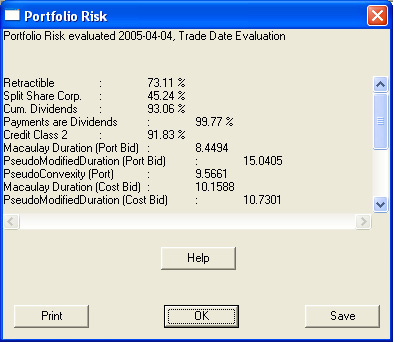
A weighted average for a portfolio for this attribute is reported by the portfolioRiskReportBox.
Something of a misnomer, since most issues characterized as belonging to this creditClass are, in fact, rated, but are not sufficiently highly rated to belong to creditClass1, creditClass2 or creditClass3.
A company established to examine the financial status of debt issuers and form a judgement as to the likelihood of these issuers being able to meet their obligations in a timely manner. The issuers are charged a fee for these judgements and the "creditRatingAgency" makes its views known to potential investors.
Current "creditRatingAgencies" in Canada include CBRS and DBRS.
A record contained in the creditRatings table of the permanentDatabase. This table allows the determination of the effective creditRatings of each preferred share in the universe as of any date analyzed by HIMIPref™.
(i) Credit ratings are assigned by companies such as DBRS to issues. They seek to measure the likelihood of the issuer being able to live up to the terms of the prospectus and do not seek to take a view as to whether the investment is attractive at any particular price. Note that different issues of stock from the same issuer may have different credit ratings based on the degree of protection set forth in the prospectus.
"With the dividend". The entitlement to the dividend in question has not been separated from the ownership of the shares. This separation occurs on the ex-Date.
Dividends are cumulative if they remain owing to investors in preferred shares when not declared in accordance with the schedule specified in the prospectus. There will generally be some constraints placed on the issuer's use of cash (e.g., for common stock dividends) until these arrears are paid. The question of whether an issues dividends are cumulative or not is considered a risk attribute.
This data is recorded in the "cumulativeDividends" field of an instrumentDataRecord.
When this datum is reported as a number, {0 is false, 1 is true}.
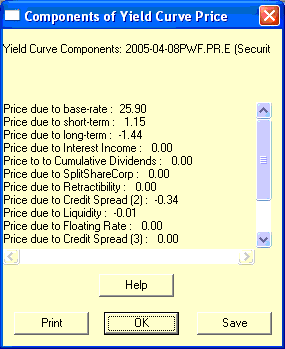
if the instrument is normally subject to the influence of the component, the curveMeanPrice is recalculated with the influence removed, and the relevent "curvePriceComponent" set to be equal to the difference. If the instrument is not normally subject to the influence of the component, the "curvePriceComponent" is set to zero.
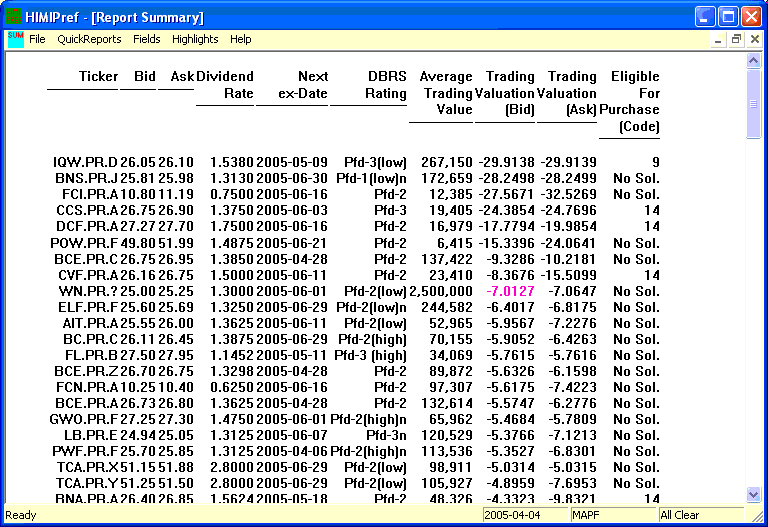
"curvePriceComponents" for all issues may be displayed on the reportSummary via the "Curve Components (value)" choice on the reportSummary|QuickReports menu.
"curvePriceComponentsProportions" for all issues may be displayed on the reportSummary via the "Curve Components (Fraction)" choice on the reportSummary|QuickReports menu.
Thus, this set of parameters attempts to quantify the effect on instrument price that will be experienced as the yield curve changes in its predicted manner.
"Curve reversion parameters" may be either positive or negative; a negative value implies reversion-to-mean is operative, while a positive value indicates that momentum is more important.
This is an optimizableParameter. There is no constraint on its size or sign. A negative value implies reversion-to-mean is operative, while a positive value indicates that momentum is more important.
The American Bankers Association's "Committee on Uniform Security Identification Procedures" which, among other things, is responsible for assigning a unique identifier ("CUSIP Number", often shortened to "CUSIP") to any publicly traded security upon request. For further information, see their website at www.cusip.com.
(i) A field contained within a custodiansDataRecord providing a unique identifier for the custodian signified by that record.
(ii)A field contained within a transactionDataRecord specifying the custodian at which the transaction signified by the record will settle and corresponding to the "custodianID" of a particular custodiansDataRecord.
A dialog box accessible via the "Add Custodian" selection on the tradeConfirmationMenu|input menu, which allows the user to create a new custodiansDataRecord. The following data may be input:
A measure of the issuer's ability to meet the terms of the investment by paying interest or dividends in the agreed manner, as well a repaying the principal of the investment at maturity. These ratings are issued by credit rating agencies (for a fee paid by the issuer) and are explicitly not investment recommendations in the buy/sell/hold sense. Most institutional fixed-income investors will not hold issues without a credit rating.
This is the yield reported in newspaper listings. It is simply the annual dividends payable divided by the current price of the security. See also currentYieldBid-spot. Sometimes referred to as runningYield.
The "curveAskPrice" is the price derived by computing the net present value of the cash flows in the curveAskTable according to a supplied yield curve.
One will note that the derivation of these option values is somewhat circular - the initial approximation is made with the prior day's yield curve, if available, or with a flat yield curve with a level equal to the mean average of the costBidYield of all instruments in the analytical universe if necessary.
The "curveBidPrice" is the price derived by computing the net present value of the cash flows in the curveBidTable according to a supplied yield curve.
One will note that the derivation of these option values is somewhat circular - the initial approximation is made with the prior day's yield curve, if available, or with a flat yield curve with a level equal to the mean average of the costBidYield of all instruments in the analytical universe if necessary.
The "curveMeanPrice" is the mean average of the curveBidPrice and the curveAskPrice. It may be computed with the discounting applied according to any particular curve.
It is used extensively in the calculation of curveVariance.
The "curve variance" is a measure used of the ability of the yield curve to account for the cash flows of all the instruments under consideration. It is this value which HIMIPref™ seeks to minimize during the calculation of the yield curve.
The "curve variance" for each instrument included in the calculation is summed to arrive at the total. First, the curveMeanPrice for the instrument under the curve is calculated.
A damping factor is applied during the calculation of an exponential moving average. It is a measure of the degree to which new data dominates the calculation. A damping factor of 1 means that only the first (earliest) measurement of any series is included in a calculation - a damping factor of 0 means that only the last (latest) measurement will be included.
Portfolios may be evaluated according to data from the transactions table (if "dataSourceTransactions" is true) or the holdings table (if false) according to choice.
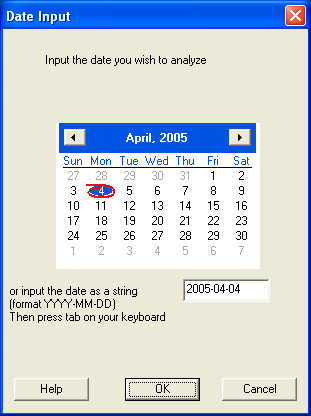
An input box allowing selection of a date. Either the desired date on the Calendar Control may be highlighted by clicking it, or the full date (in YYYY-MM-DD format) may be entered in the appropriate edit box. Note that there will usually be a restriction on the valid dates that may be entered - an error message will appear if an invalid date is chosen and the user may retry.
Also, note that the date is not actually chosen until the "OK" button is clicked; dates entered as text will be displayed on the calendar allowing for selection of a particular day of the week or month-end.
(i) The Dominion Bond Rating Service (DBRS) is a credit rating agency: it receives a fee from issuers to assign credit ratings to their borrowings, which often comprise commercial paper, preferred shares and bonds. Although there is clearly a potential for a harmful conflict of interest, the demand by investors (including Hymas Investment Management) for such credit ratings makes obtaining them virtually obligatory for the issuers. Further information regarding DBRS and updated rating information on issuers, may be obtained from their website.
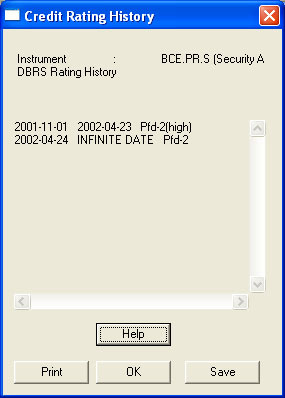
(ii) A field contained within a creditRatingDataRecord, specifying the "DBRS" rating for the defined security and period. This datum is available through the creditRatingHistoryBox.
A dialog box accessible via the tradeConfirmationMenu|Input menu which allows for the input or edition of a dealerRecordType. The following fields are input by typing in the appropriate boxes:
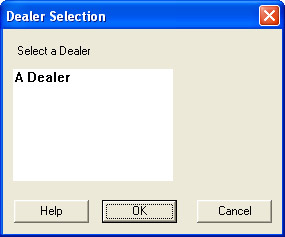
A dialog box utilized during the tradeInputProcess to allow selection of the counterparty to the trade. To select a dealer, highlight the dealerName of the dealer and click "OK"
When an issue is redeemed or retracted at a price above its par value, the difference between the two numbers is considered to be a "deemed dividend" and is taxed as a dividend.
Rarely issued, a "deferredPreferred" will not pay regular cash dividends for all or most of its life; the investor will receive his 'time value of money' in the form of a maturity price greatly in excess of the issuePrice.
The first date on which a listed issue has no closing quotation available on the Exchange. Issues which have been delisted are no longer traded on the Exchange - this usually happens due to reorganizations, such as redemptions. The database requires that all delistings be associated with an event recorded in the reorganization database, which provides information on what has happened to the issue. By convention, the value date of the reorganization database is equal to the delisting date.
(i) A field in a systemConstantsRecord that provides a short (not more than 50 characters) description of the record, indicating the type of portfolio for which the optimizableParameters have been optimized.
If the parValue of the instrument is less than the curveBidPrice, "differenceFromPar" is the difference between the two values; otherwise
If the parValue of the instrument is greater than the curveAskPrice, "differenceFromPar" is the difference between the two values, otherwise
"differenceFromPar" defaults to zero.
. In other words, "differenceFromPar" may be thought of as the change required in the parValue in order to get it within the bounds of curveAskPrice and curveBidPrice.
The amount by which the price under consideration (market price, redemption price, etc.) is under the issue price. An instrument issued at $25 and trading at $24 has a discount of $1. The opposite of "discount" is premium.
where blendedRate is the interest rate applicable according to the yield curve and the time to maturity and time is the time from the calculation date until the cashFlowDate
Note that if "blendedRate" is a constant, it may be referred to as the discountingRate.
A payment made to holders of shares in a corporation, paid from the profits of the corporation. Dividends on preferred shares are normally set in advance or calculated in accordance with a set formula, as stated in the prospectus. Unlike interest income, dividends are eligible for the dividend tax credit.
This parameter seeks to quantify the extra return that may be gained by capturing a dividend. If quotations of instruments were constant irrespective of dividend ex-dates, one would expect "dividendCapture" to be high - if flatBidPrice & flatAskPrice were constant, one would expect "dividendCapture" to be low.
A field in an instrumentDataRecord which specifies the number of dividend payments which are expected annually (virtually always either four or twelve).
The time between two successive dividends, assuming that dividends are paid in accordance with the terms of the prospectus. The interval can be measured between ex-dates, record dates or pay-dates according to need and context. The precise value of a "dividend interval" can vary from period to period, due to complexities of the calendar and, to a certain extent, the whim of the directors who declare the dividend.
A temporary variable calculated and stored during simulations to record dividends during the period between the ex-date and the record date. While such funds cannot be spent, not having been received, they are included as part of the portfolioCashValue. This value is reported by the portfolioReportBox.
A method of treating dividend income under Canadian Tax Law, whereby a greater-than-actual amount of taxable income must be declared on individual tax returns, but a relatively large credit is deducted from actual tax owing. The effect is to reduce the marginal tax rate payable on dividends, which in the 2003 tax year is less than that on ordinary income, but greater than that on capital gains.
A calculated value used in the subsequent calculation of capitalGainFrictionBid / capitalGainFrictionAsk that seeks to quantify the sensititivity of the valuation to relatively small price changes. It is defined as:
A procedure called by calculateTradeSize which determines whether the instrument is eligible for purchase according to the systemConstantsRecord applicable to the trade.
The pseudoModifiedDurationCost of the issue purchased is examined. If it is undefined, the size of the trade is set to 0.
The numerical result of the eligibleForPurchase function. If the result is reported as "No Sol.", the instrument has passed all the tests set in that function. Otherwise, the value reported is the "Numeric Value" specified under the heading tradeSizeCalculationNotes if this value is noted as being so reportable.
A procedure called during the calculation of trade size.
If the size of either the sell side or the buy side of the trade has been reduced to zero (by the action of other trade size procedures called by calculateTradeSize) the entire trade is reduced to zero. This ensures that the valuation of an instrument is not used to determine the tradeScore or tradeDesirability of a trade which actually being performed against cash.
A hurdle rate is set equal to one-half the value of PARAMETER_PORTFOLIO_MINWEIGHT for each side of the trade that is defined (so a swap has the full value of this parameter, whereas an outright purchase or sale has only half the value). If the hurdle value is greater than trade weight, the size of the trade is set to zero.
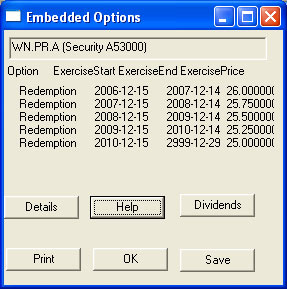
"Embedded Options" are options exercisable by the issuer or by the shareholder in accordance with the terms of the prospectus. These will most often be options to redeem or to retract the security.
They are referred to as "embedded" because they are intrinsic to the security and cannot be traded separately.
A text file stored in the userDirectory that logs error messages and other information specified by the HIMIPref™ client programme. This file is erased and re-written every time the HIMIPref™ programme is run. The administrator may ask, in the event of an error, for a copy of the "errorOutput.txt" file to be emailed to him.
The cut off date for determining whether a particular transaction is included in the accounting for the activePortfolio, which may be done on a tradeDate or valueDate basis.
the absolute value of the difference between the rewardComponentsBid (of the instrument sold) less the rewardComponentsAsk (of the instrument bought) is greater than the "hurdle", AND
this difference is negative
, then
both the difference and the "hurdle" are subtracted from "excessRewardDecreases"
Note from the definition that this value is constrained to be positive.
If either side of the trade is "Cash", then both excessRewardIncreases and excessRewardDecreases are defined as zero and therefore "excessRewardDifferenceValuation" will be zero.
The purpose of this component of bidToOfferPickup / offerToBidPickup is to account for situations in which unusual circumstances conspire to make a trade excessively attractive due to the influence of a single rewardComponentBid / rewardComponentAsk; the influence of this attribute, in essence, demands confirmation from several components and as such may be thought of as being related to rewardDecreasesValuation.
the absolute value of the difference between the rewardComponentsBid (of the instrument sold) less the rewardComponentsAsk (of the instrument bought) is greater than the "hurdle", AND
this difference is positive
, then
difference less the "hurdle" is added to "excessRewardIncreases"
Note from the definition that this value is constrained to be positive.
The first day of trading on which a buyer of shares is not entitled to receive the contemporary dividend (i.e. the shares are ex-Dividend commencing with the "ex-Date"). This date is therefore very important in the valuation of preferred shares and preferred securities.
"Without the Dividend.", i.e., the entitlement to dividend being referred to has been separated from the ownership of the shares. The opposite of "ex-Dividend" is cum-Dividend. See ex-date.
The date the holder of an option exercises his rights to effect the transaction specified in the terms of the option. In the reorg database, this date is referred to as the valueDate.
"issuance(isCall)" is issuance cost for calls, zero for puts
Note that the sum of the "exercise probabilities" of the elements of the list is constrained to be 100%, with any adjustment necessary performed against the latest, final maturity, element of the list.
"expected bid" = currentBid + amountAmortized * (termToCalculation/termToMaturity)^PRICE_AMORTIZATION_EXPONENT where "currentBid&quit; is the actual bid price of the instrument on the calculation date, "amountAmortized" is the maturity price less the "current bid" "termToCalculation" is the term, in years, from the calculation date to the exerciseDate "termToMaturity" is the term, in years, from the calculation date to the ultimateMaturityDateUsed
An exponential moving average takes all information in the given period into account, assigning greater weight to more recent data: each day's data is applied successively to the moving average, so that:
EMA(new) = DF*EMA(old) + (1 - DF)*data
where
EMA(new) is the new exponential moving average
EMA(old) is the prior day's exponential moving average
In certain cases, the analytical methodology may adjust the damping factor and the data depending upon the relationship between the data and EMA(old). See volume - average.
The completion of an order. An investor who put in an order to buy 200 shares and actually bought 200 shares has been filled; if he actually bought only 100 shares, he has been partially filled; if no shares were purchased he has not been filled.
This is the dividend that is paid upon the maturity of an instrument. It may be more or less than a regular dividend payment, depending upon the relationship between the maturityDate and the prior dividendpayDate.
Each completed calculation of an option calculation list will include exactly one element with its maturity flag set to indicate the fact that it is considered a "final maturity" with no calculations being performed after the exercise date of the element.
The maturity flag of a "final maturity" may take one of four values:
The yieldToMaturity for a costBidDiscountingTable is performed using a formula to derive the present value of regular dividends and the maturityPrice, to which is added the present value of any adjustments. The first dividend paid on an instrument after its issue is usually not the regular amount - it may be more or less than the regular amount depending upon the relationship between the issue date and the first dividend payDate. This difference is entered on the adjustment table so that the first dividend, in sum, is properly accounted for.
An issue which commences its existence paying a fixed dividend, but which changes to floating rate on some particular date in accordance with the prospectus, e.g., The Maritime Life Assurance Company Non-Cumulative Redeemable Second Preferred Shares, Series 1:
The initial dividend, if declared, will be payable on December 31, 1999 in the amount of $0.17405 per share, based upon an anticipated issue date of November 19, 1999. After December 31, 2004, dividends will be at the Applicable Rate in effect from time to time. The "Applicable Rate" for any quarterly dividend period during each five year period commencing after December 31, 2004 will be determined by applying to $25.00 one quarter of the greater of (i) 90% of the Prime Rate and (ii) 5.85%.
An asset class including bonds and most preferred shares, comprised of all instruments in which the expected cash flows are an obligation of the issuer that is known in advance (or, in the case of floatingRate issues, is calculated from a market rate independent of the fortunes of the issuer via a set formula). This asset class is distinguished from equity by this prior arrangement, which is described in the prospectus - most simply stated, a "fixed income" investor will receive fixed amount, while an equity investor will pay or receive the difference.
An issue which commences its existence paying a fixed dividend, but which changes this rate on some particular date or dates in the future in accordance with the prospectus. For example, the BCE Inc. prospectus dated December 10, 1997 for the issue of "Cumulative Redeemable First Preferred Shares, Series Y" included the following provisions in the section "Principal characteristics of Series Z Preferred Shares"
Dividends: Fixed cumulative preferred cash dividends payable quarterly on the first day of March, June, September and December in each year.
At least 45 days and not more than 60 days prior to the start of the initial dividend period beginning on December 1, 2002, and at least 45 days and not more than 60 days prior to the first day of each subsequent dividend period (the initial five year dividend period and all subsequent five year dividend periods being referred to as a "Fixed Dividend Rate Period"), BCE Inc. shall set, and provide written notice of, a Selected Percentage Rate for the ensuing Fixed Dividend Rate Period. Such Selected Percentage Rate shall not be less than 80% of the Government of Canada Yield determined on the 21st day preceding the first day of the applicable Fixed Dividend Rate Period.
This value is useful as an indicator of market price which is not subject to the "sawtooth" pattern expected of most intruments, which should be subject to a decrease in price on every ex-date approximately equal to the dividend payable. This value is also referred to as flatAskPrice-Spot.
A calculated value of the price of each instrument, adjusted to eliminate the effect of so-called accrued dividends. The "Current Bid (Flat Value)" is then the actual bid price less the accrued dividendFlatValue
This value is useful as an indicator of market price which is not subject to the "sawtooth" pattern expected of most intruments, which should be subject to a decrease in price on every ex-date approximately equal to the dividend payable. This value is also referred to as flatBidPrice-Spot.
An issue is referred to as being floating rate if the amount of dividends or interest income payable to the holders is dependant upon a short-term rate in a manner defined in the prospectus. This short-term rate is usually, but not always, the Canada Prime Rate; the formula used to determine the rate payable on the issue can often be quite complicated. Whether or not an issue is floating rate is considered to be a risk attribute. Note that in HIMIPref™ an issue is considered to be floating-rate for risk determination purposes even if it is currently fixed-rate, but will become floating rate on a definite date in the future (a fixed-floater). Issues are not considered to be "floating rate" if the dependence upon the floatingRateIndex is currently constrained by a cap or collar on such rate. For example, the prospectus for NA.PR.J (National Bank Non-cumulative First Preferred Shares Series 13) dated July 3, 2000 states:
After August 15, 2005, the dividend on the Preferred Shares Series 13 for each quarter will be determined by multiplying $25.00 by one quarter of the greater of (i) 95% of the rate which is the average of the Prime Rate in effect each day during the three months ending on the fifteenth day of the month immediately preceding the month in which the dividend payment date occurs and (ii) 6.15%
This is reflected in HIMIPref™ as formulaFLOATING_RATE_GO2126. When the canadaPrimefloatingRateIndex falls below about 6.47%, the dividends will not fall proportionately, and therefore the issue is not be considered to be "floating rate" when this is the case.
This field specifies the formula to be used in computing the instrument's floatingRate from the supplied value of the floatingRateIndex, subject to adjustments indicated by the fields formulaMax and formulaMin.
Friction is used to denote the costs of a performing a trade. These costs include dealers commissions, settlement fees and capital gains taxes. Of these, the first two will always work against a decision to trade, as they always work against the investor. Capital gains taxes may work in the investor's favour if the instrument to be sold is trading at a loss and the investor currently has a taxable capital gain - in this case, the fact that performing the trade will reduce the amount of tax already payable will work in favour of a decision to trade.
For example, consider the case of an investor who owns 1000 shares of TRP.PR.X, bought at $45 and currently trading at $44. These shares are virtually identical to TRP.PR.Y. The investor has (through other investments) a taxable capital gain of $1000, on which tax will be paid at a rate of 32.9%, or $329. If the investor sells TRP.PR.X to buy TRP.PR.Y at the same price, then his portfolio will, in terms of expected future returns, be almost unchanged by the trade, but the fact that a $1000 capital loss was realized will eliminate his current capital gain and reduce his tax by $329.
There is no free lunch: when the TRP.PR.Y are sold later on, the capital gain will be greater by the same $1000 and taxes will be correspondingly greater. Transaction costs also must be considered. However, the fact that these taxes will be payable further into the future than would otherwise be the case (in many ways equivalent to an interest-free loan from the tax-man) increases the attractiveness of the trade.
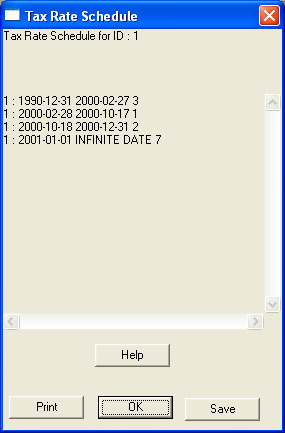
(i) A field contained in a taxRateScheduleRecord. Its purpose is to define the starting date (inclusive) of the period for which the record is effective in identifying a taxRateDataRecord to be used for analytical purposes. This datum may be displayed in the taxRateScheduleBox.
(ii) A field contained in a FRBenchmarkType record. It specifies the starting date (inclusive) of the period for which the record is effective in recording the benchmark interest rate. This datum is available in the ratchetRateCalculationBox.
A calculated or defined variable that quantifies some aspect of an instruments characteristics without making a judgment on the importance of that characteristic. Most "fundamentalAttributes" are operated on by optimizableParameters in order to determine the rewardComponentsBid / rewardComponentsAsk of that instrument; other "fundamentalAttributes" are used at various stages in the calculation of tradeScore and tradeDesirability to assess the degree of confidence that should be placed in the relative valuation of the securities considered.
Calculated "fundamentalAttributes" are stored in the system in the riskRewardDataType structure.
A function called during the calculation of Dividend Amount (Flat Value), among other places. It calculates the amount of a single dividend payment for a single instrument by determining, in order:
A context menu available on the graphDocument that can be used to provide further information regarding the data plotted on a graph. Specific versions of this menu are:
A context menu available on the graphDocument when right-clicking on a point produced on a graph created through the "Instrument Price Variance" or "Attributes" selection on the graphMenu|Settings popup menu. Most selections from this menu allow the choice of dialog boxes which will provide further details of the calculations performed on the instrument/price represented by that point. Specific choices are:
Remove Point from Graph : The right-clicked point will no longer be drawn on the graph. Grid lines may be recalculated (see graphMenu|View) and the point will not be included as part of a regression analysis (see regressionResultBox
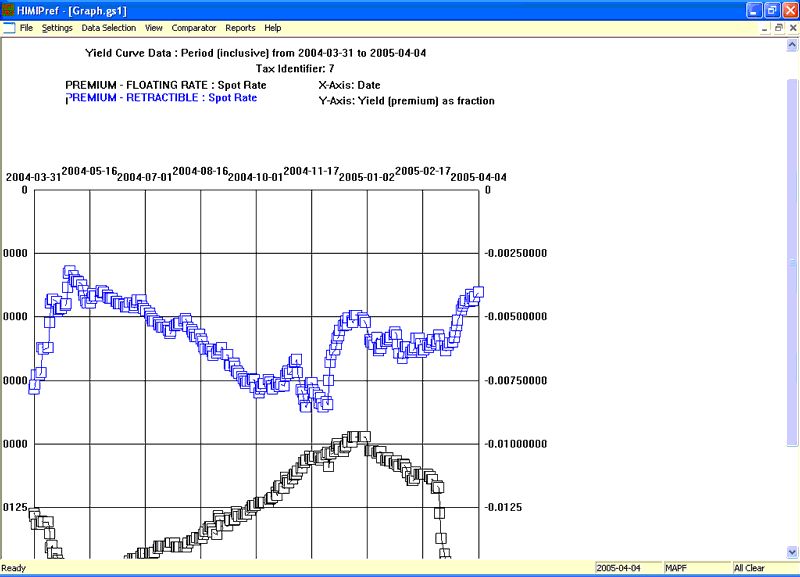
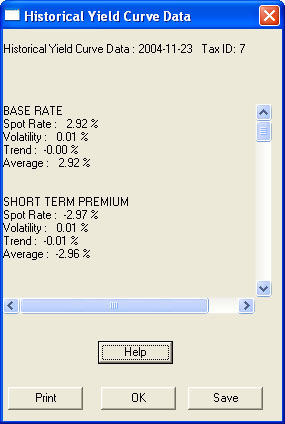
A context menu displayed when a point on a graph of historical yield curve data ("Select Period (Yield Curve Data)" on the graphMenu|settings menu) is right-clicked.
This context menu is available via the "Data Selection | Select Specific Data" selection on the graphMenu after "Attributes" has been selected on the graphMenu|Settings menu.
It allows for the choice of data to be displayed:
"Select X-axis" : displays the fieldsMenu to select the X-Axis
"Select Y-axis" displays the fieldsMenu to select the Y-Axis
A pop-up menu accessible via the "Data Selection|Select Specific Data" selection on the graphMenu after "Select Period (Yield Curve Data)" has been selected on the graphMenu|Settings menu.
This pop-up menu allows the choice of what yieldCurve data as recorded on the yieldCurveAveragesRecords is to be graphed for the defined period:
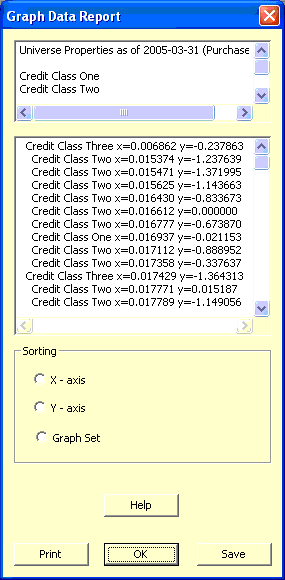
A dialog box accessible via the "Show Data" selection on "graphMenu|Reports" menu.
This dialog reports the data displayed on the graph; the upper panel displays the title and sub-title of the graph, followed by the captions of the "X" and "Y" axes. The middle panel displays the data, with each line representing one point on the graph, specifying the graphSetType, the "X" value and the "Y" value. Finally, the lower panel allows selection of how the data in the middle panel are to be sorted - options are
A document allowing the preparation of graphs, accessible via the "Graphs" selection on the mainMenu|Research popup menu. The "graphDocument" is controlled by the graphMenu and additional reports and actions are available through the graphContextMenu.
To prepare a graph, the type of data to be plotted is first selected from the graphMenu|Settings popup menu, and then the specific data selected via the graphMenu|DataSelection|"Select Specific Data" selection.
"Select Specific Data" : Displays a context menu dependent upon the choice made under graphMenu|Settings
Instrument Price Variance : displays the fieldsMenu for selection of the Y-axis of the graph. Right-clicking points on the graph produced will display the graphContextMenu|attributes context menu.
Comparator : These menu items will only be available if "Select Historical Instrument" has been selected on the graphMenu|Settings menu.
Set Comparator : This will allow selection of another instrument from the instrumentSelectionBox and allow the plotting of data for this instrument to be displayed on the graph together with that of the "main" instrument
Delete Comparator : deletes comparator information from the graph.
A popup accessible via the "Settings" selection on the graphMenu which allows selection of the type of data that is to be displayed on the graphDocument. Options available are:
Instrument Price Variance : displays the instrumentSelectionBox followed by the doubleInputBox for selection of the price range. This selection allows for a determination of how an instrument attribute (selected via the standard fieldsMenu) will vary with its price and enables the "Change Price Range" selection on the graphMenu|View popup menu.
Select Period (Yield Curve Data) : This selection graphs yieldCurve coefficients vs. time. The dateInputBox is displayed twice to select the period, then the taxRateQueryProcess is run and finally the graphContextMenu|yieldCurveTypeSelect context menu is displayed to select the field of the yieldCurveAveragesRecord that is to be graphed. Multiple series may be displayed via the "Data Selection|Select Specific Data" selection of the graphMenu
Attributes : Allows the graphing of two selected attributes against each other for data calculated on a given date. The dateInputBox is displayed to select the date, then the taxRateQueryProcess is run, then the booleanInputBox is displayed to determine whether the points displayed should be restricted to instruments eligibleForPurchase. This choice enables the "Segregate by Credit", "Credit Class 1", "Credit Class 2" and "Credit Class 3" selections on the graphMenu|View popup menu.
Segregate By Credit : Enabled only when "Attributes" has been selected on the graphMenu|Settings menu. When selected, points representing instruments of different creditClasses will be represented by boxes of different colours.
Credit Class One : Enabled only when "Attributes" has been selected on the graphMenu|Settings menu. When selected, points representing creditClass1 will be displayed.
Credit Class Two : Enabled only when "Attributes" has been selected on the graphMenu|Settings menu. When selected, points representing creditClass2 will be displayed.
Credit Class 3 : Enabled only when "Attributes" has been selected on the graphMenu|Settings menu. When selected, points representing creditClass3 will be displayed.
Regression : Performs a multilinear regression of the data displayed on screen and displays the results in a regressionResultBox
Change Price Range : Enabled only when "Instrument Price Variance" has been selected on the graphMenu|Settings. This will display the doubleInputBox for selection of a price range over which the selected instrument should be varied as a proportion of its market price.
A setting of graphSetType that indicates the data is supplied as a comparator for the main data referred to with the indicator GRAPH_SET_MAIN. It may be used when plotting the yieldCurve for a single day (graphMenu|Settings|Yield Curve) and for the first instrument selected when plotting historical attribute data (graphMenu|Settings|Historical Instrument). This set will be indicated on reports as "Comparator Set - 1".
A setting of graphSetType that indicates the data is supplied as a comparator for the main data referred to with the indicator GRAPH_SET_MAIN and is distinct from that identified with GRAPH_SET_COMPARATOR. It may be used when plotting the yieldCurve for a single day (graphMenu|Settings|Yield Curve). This set will be indicated on reports as "Comparator Set - 2".
A setting of graphSetType that indicates the data has been created by determining the difference in the "y"-values between the GRAPH_SET_MAIN and GRAPH_SET_COMPARATOR points for a given value of "x".
A setting of graphSetType that indicates the data is the "anchor" for the graph. It is used when plotting the yieldCurve for a single day (graphMenu|Settings|Yield Curve) and for the first instrument selected when plotting historical attribute data (graphMenu|Settings|Historical Instrument). This set will be indicated on reports as "Main Set".
An enumerated type used in the determination of which points on the graph are related. Each point displayed on the graphDocument is associated with one of the following possible values:
The ability of the investor to demand cash from the issuing company in exchange for his shares. The amount of cash, notice period and time at which this right may be excercised being specified in the prospectus at time of issue.
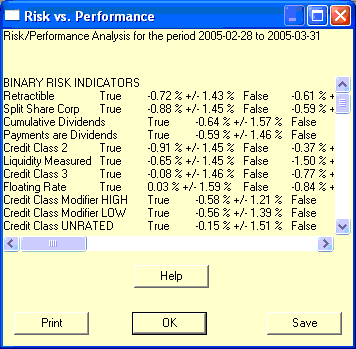
A methodology, displayed in the riskPerformanceBox, of analyzing the universe of preferred shares examined by HIMIPref™ whereby for each binary riskAttribute (as well as liquidityMeasured and Credit Class UNRATED) the universe is sorted into two subsets, such that each subset is homogeneous for the attribute examined. A determination is then made of the distribution of the other binary indicators in each subset. Note that in a perfectly homogeneous universe, the analyses of the two subsets would yield identical results.
Results are reported as a series of columns, each "major" column reflecting the attribute used to make the division between the two subsets, which are the "minor" columns labeled "True" and "False" below the major column heading. Rows are reported in the same order from top to bottom as the columns are presented from left to right.
Example: Consider the following extract from the table of a Raw Heterogeniety Analysis:
Retractible
Split Share Corp
True
False
True
False
71-0
0-70
32-0
39-70
32-39
0-70
32-0
0-109
From the top row of the first major column, we obtain the trivial (reflexive) result that of 71 Retractible issues examined, 71 were retractible and 0 were not. A similarly trivial result is obtained for "Split Share Corp" in the second row of the second major column.
More interesting results are obtained off the diagonal. From the second row of the first major column, we learn that of the 71 retractible issues, 32 were Split Share Corporations and 39 were not. Of the 70 non-retractible issues, none were Split Share Corporations.
In a Percentage Heterogeniety Analysis the data are presented as a percentage of the cell that is "True", so the 32-39 split in the above table is reported as 32 / (32+39) = 45.07%.
This selection graphs a selected attribute of a particular instrument (Y-axis) vs. time (X-axis); it is accessible via the "Historical Instrument" selection on the graphMenu|Settings popup menu on the graphDocument.
Some data normally accessible on the fieldsMenu may not be plotted with this option, as these data are not stored subsequent to their calculation and immediate display:
where "historicalVolatility[x]" is the historical volatility on day x dailyVolatility is { 0, if the day's change is the same sign as the historicalTrend; or adjustedSpotRate[i] - spotValue[i-1], otherwise}
If there is no record for the prior day, the "historicalVolatility" is set to 0 if the spotValue is defined, otherwise it is also undefined.
The ask price of the shares as defined in the activePortfolio. This may not be equal to the ask shown elsewhere on the reportSummary since the holdings may have been valued as of a different date.
The bid price of the shares as defined in the activePortfolio. This may not be equal to the bid shown elsewhere on the reportSummary since the holdings may have been valued as of a different date.
This component seeks to quantify the degree by which valuations should be reduced solely due to a desire to avoid maximizing holdings in an issue before the best time - that is, to retain a capacity to purchase additional shares of an attractive issue should the price decline further. This penalty is applicable only to the valuation of the issue to be purchased. It is equal to:
A calculated vector of RISK_MEASUREMENT_AXIS_TYPE_MEMBERS length, one for each risk attribute. For each member, if the corresponding values of portfolioWeightedRisk and indexWeightedRisk are both defined, the "holdingsRiskDifference" is obtained by subtracting the latter from the former; or else the value will be set equal to the corresponding value of the attribute for the instrument being sold; or if no instrument is being sold, the value will be set to "undefined"
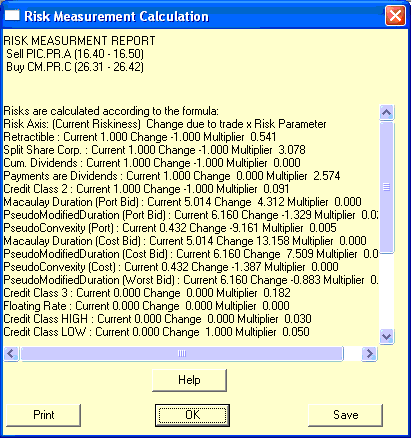
The "holdingsRiskDifference" vector is used in the calculation of riskUp, riskDown and subsequently riskDistance.
A temporary variable calculated and stored during simulations to record the taxes which will become payable on the next tax payment date. Such amounts have not yet affected the cash in the portfolio, but are allowed for as part of the portfolio cash value.
A collection of issues with assigned weights which purports to provide an overall view of the market or a specified subsection thereof. The most important index for Canadian preferred share management is the BMO Nesbitt Burns 50 Index.
The index is used when optimizing portfolios according to the portfolio method in order to determine the risk characteristics of the portfolio and the effect of any proposed trade.
The index used in portfolio management is a constraint
(i) A field in an indexCompositionRecord which specifies the index to which the information in the record applies. It corresponds to the "indexID" field in an indexNamesType record.
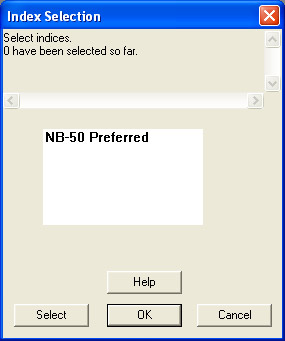
An input box allowing the selection of one or more indices from the defined list. The text in the selection box is the indexName field of indexNamesType.
To select an index, highlight the indexName and click the "Select" button; the number of indices selected and their names will then be listed in the upper panel of the "indexSelectionBox". When all desired indices have been selected, click the "OK" button to accept the list.
The particular risk attribute for each security in the portfolio is incalculable.
If a particular risk attribute for a particular security is incalculable, the "indexWeightedRisk" is calculated as if that value was equal to the average of the other values.
A market is inefficient if information regarding the value of a particular investment is not communicated rapidly to its market price. If, for example, a listed company existed which had as its sole business the holding of particular common shares for investment purposes, we would expect changes in the prices of those shares to be instantaneously reflected in the price of the holding company's shares. The market is "inefficient" to the extent that this effect is delayed, or not reflected at all.
Another example would be two series of bonds issued by the same company, which had identical terms, issue sizes and distribution of holders. The market would be inefficient to the extent that the prices of these bonds on the market was not identical.
A procedure called as part of the determination of trade size, which performs a number of steps to determine a rough approximation of the size of trade being contemplated. In the portfolio method and in the issue method when numberSwapSecuritiesDesired is non-zero:
Desired cash proceeds from the sale are estimated as the cash requirements for the purchase, less cash already in the portfolio.
This is adjusted to reflect a sale in board lots which does not exceed current holdings of the issue sold.
If such a sale would leave less than PARAMETER_PORTFOLIO_MINWEIGHT weight of the issue sold in the portfolio, the entire holding of the issue is set to be sold.
The number of shares to be purchased is then calculated to reflect an integral number of board lots with a total value less than the available cash.
Note that "instrument reversion parameters" may be either positive or negative: a negative value implies that reversion-to-mean is the operative principle, while a positive value implies that momentum is more important.
Note that "instrument valuation parameters" is constrained to be positive: all the relevent calculated values are considered to be "good" for the instrument - e.g. higher yield, higher priceDisparity, etc.
A table contained within the permanentDatabase that contains instrumentDataRecords. It contains basic information regarding all instruments that have ever been examined by HIMIPref™.
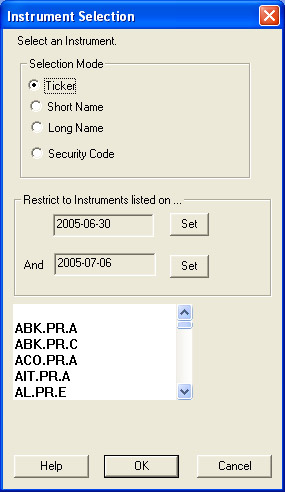
A dialog box in which a single instrument may be selected from a list of those available. As defined by the radio buttons on the box, the list may be presented as one of:
Through application of this scaling factor in the calculation of totalRewardBid / totalRewardAsk (specifically, classRewardYieldBid / classRewardYieldAsk), the end-value of these calculated variables is expected to be identical no matter what multiplier is applied to the parameters (which aids in simulation) and these values should reflect the expected percentage return over one year.
Interest income is paid by the issuer on preferred securities, sometimes referred to as COPrS's, from its pre-tax income. Such income, unlike dividends does not have the benefit of the dividend tax credit and is taxed at the marginal rate associated with ordinary income.
Information regarding the type of income paid by a security is contained in the instrumentDataRecord. This is one of the riskAttributes of HIMIPref™.
This is the fraction of the issue price that an issuer may expect to pay as sales commission on a new issue of shares. It is constrained to be between 0.0 and 0.1.
This penalty is applied to each instrument in accordance with the number of multiples of effectiveMinWeight that are held in the portfolio. The objective behind this parameter is to make it harder to increase a position as the existing position becomes a greater part of the total portfolio, so that it is harder to buy the nth minWeight block of any given instrument as n increases.
The value of this parameter is constrained to be non-negative.
A method of portfolio optimization in which the possible individual sales are paired with each each possible purchase and a decision regarding whether to trade or not is based solely on consideration of these two issues - the overall portfolio and its risk characteristics are not considered at all. Thus, a portfolio optimized in accordance with the "issue method" may, for instance, be holding only floating rate issues.
A trade is indicated if the following conditions are met:
Implementation of the "issue method" is affected by the value of the portfolio data record setting for desired swap issues - a non-zero constraint may be relaxed to allow such a portfolio to hold at least one issue affected by the constraint.
The price at which the instrument was issued, that is, sold to investors directly by the company. This is the primary market for the shares; subsequent trading between investors is referred to as the secondary market. The issue price is normally equal to the par value of the shares; the few exceptions to this rule are usually deferred preferred shares.
The issuers are the companies who sell their stock on the primary market and receive the issue price from investors in return for agreeing to meet the obligations set forth in the prospectus. Their ability to meet these continuing obligations is estimated and quantified through their credit rating.
An order to execute a trade only at a certain price or better. This may result in obtaining only a partial fill or perhaps not executing the trade at all.
The ability to trade in an investment without affecting the market price. It may be possible, for instance, to buy 100 shares of Royal Bank at $50 instantly, but a large investor seeking to buy 100,000 shares immediately might have to pay $51 in order to have his order filled. If the larger investor had put in a limit order for 100,000 shares at $50, he might end the day with a fill of fewer shares, if any, than he wanted to buy.
See maxDaysToTrade and swap value for commentary on the application of this concept to HIMIPref™.
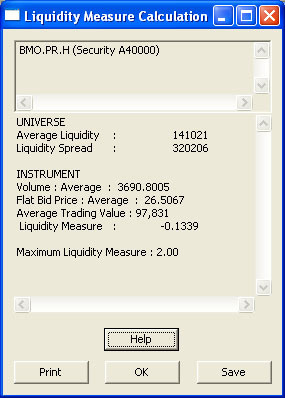
A measure of the relative liquidity of the issues available for investment. This value is computed for each instrument when the values for liquidityAverage and liquidityStandardDeviation are known and is equal to:
This value is used in the computation of the yieldCurve in which, like a risk attribute, there is the possibility of the instrument's curvePrice being dependent upon the value of this attribue.
The first date the issue is traded on the exchange (see listing) and has a closing quotation available. The "listingDate" of an instrument is recorded in its instrumentDataRecord.
"Long" is usually an adjective denoting ownership. Thus, if you own 100 shares of something, you are said to be "long" 100 shares. The word can also be used as a noun (e.g. "The longs expect interest rates to fall") and a verb (e.g. "We should be longing retractibles").
The long name of an issue is a 50-character representation of the legal name of the issue. The long names used in HIMIPref™ will generally, but not always, be the same as those reported by the Toronto Stock Exchange. These "long names" are recorded as an eponymous field in an instrumentDataRecord. See also short name.
A calculated value, used in the subsequent calculation of totalBuyCommission and applicable only when PARAMETER_TRADING_MAXDAYS is aggressively set to a value in excess of 1.0.
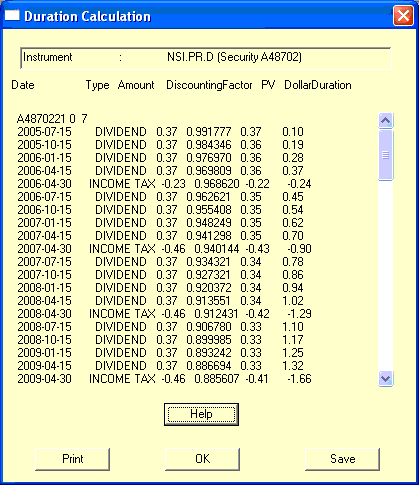
As stated by Robert W. Kopprasch, Ph.D., CFA, in The Handbook of Fixed Income Securities, Second Edition, Dow Jones-Irwin, 1987, ISBN 0-87094-745-1, referencing Frederick Macaulay, Some Theoretical Problems Suggested by Movements of Interest Rates, Bond Yields and Stock Prices in the United States since 1856, National Bureau of Economic Research, 1938,
...described a measure he called duration, which measures the weighted average time until cash flow payment. The weights are the present values of the cash flows themselves
so
"Macaulay Duration" = sum(w[i] * t[i]) / sum(w[i]
wherew[i] is the present value of the i'th cash flow, which becomes due at time t[i].
"Macaulay Duration" is a useful approximation of sensitivity to interest rates, but can give very misleading results when the yield curve changes shape. It is often used in the calculation of modified duration.
Note that the numerator in the equation above, sum(w[i] * t[i]), may be referred to as totalDollarDuration, while the denominator is presentValue.
A popup menu accessible through the mainMenu. This menu gives access to major file-changing commands in the system
Next Business Day : changes the analyticalDate to the next business day. If there is no priced date following the current analyticalDate, the system is reset so the final effect is no change.
A popup menu accessible via the "activePortfolio" selection on the mainMenu|reports popup menu. Data displayed via this menu reflect the settings and calculations of the activePortfolio
An order to execute a trade at whatever price is available in the market. This can often have fearsome consequences. If 100 shares of Royal Bank are offered at $50 and the only other offer on the exchanges books is for 100 shares at $60, it is entirely possible that a market order to buy 200 shares will lift both offers, resulting in an average cost of $55 per share. The investor has been filled, but perhaps at a cost much greater than he intended or expected.
The rate of tax payable on additional income beyond that already declarable by the taxpayer, e.g. if an investor has a base income of $100,000 p.a., on which taxes of $35,000 are payable, but additional income is taxed at 50%, then the marginal tax rate is 50%. An investor with employment income of $100,000 will face different marginal rates on investment income than will an investor with employment income of $40,000, all else being equal. There are three marginal rates of interest in the analytical system, applicable to
A constraint that limits the number of recursions that will be attempted in the course of calculating the optionCalculationList. If this count is exceeded an error results.
A constraint which sets the upper limit on the number of years an issue may be considered to be outstanding. At the end of this period, the analytical calculations assume that the issue is matured at the ultimateMaturityPrice. See optionCalculationList for the computational algorithm.
The date on which the investor receives the maturity price in exchange for his holding. This may be either a calculated or defined date, according to context. See maturity and optionCalculationList.
The value of the "maturity flag" on a particular option element records the nature of the option element. The values marked with an asterisk (*) are final maturities.
A constraint in the programming specifying the number of day's notice that is assumed to be required between determining that an issue is to be redeemed and actually redeeming it.
The value which is to be received by the holder of an issue upon the maturity of an issue on its maturity date. This value may have been specified in the prospectus, or it may have been calculated for analytical purposes in the preparation of the optionCalculationList.
This maturity flag indicates that a put is due to become exercisable during or after the term of a call and at a higher price than this call. The analytical system then assumes that the call is certain to be exercised as a soft maturity. This is a finalMaturity.
If "maxDaysToTrade" is set to 0.5, for example, the implication for simulation purposes is that an amount of shares equal to half the average daily trading value of the issue may be reasonably expected to be sold at the bid price.
If the value is between 0 and 1, the value represents the upper limit on the weight of the riskAttribute in the portfolio, although in the issueMethod the value may be superseded by 1 / desiredSwapIssues if this value is larger.
If the value is between 1 and 2, the value represents 1 + the lower limit on the weight of the riskAttribute in the portfolio.
If the value is exactly 1, the parameter has no effect.
If the value is exactly 0, the portfolio is not permitted to hold issues with this riskAttribute.
If the value is between 0 and 1, the value represents the upper limit on the weight of the riskAttribute in the portfolio, although in the issueMethod the value may be superseded by 1 / desiredSwapIssues if this value is larger.
If the value is between 1 and 2, the value represents 1 + the lower limit on the weight of the riskAttribute in the portfolio.
If the value is exactly 1, the parameter has no effect.
If the value is exactly 0, the portfolio is not permitted to hold issues with this riskAttribute.
If the value is between 0 and 1, the value represents the upper limit on the weight of the riskAttribute in the portfolio, although in the issueMethod the value may be superseded by 1 / desiredSwapIssues if this value is larger.
If the value is between 1 and 2, the value represents 1 + the lower limit on the weight of the riskAttribute in the portfolio.
If the value is exactly 1, the parameter has no effect.
If the value is exactly 0, the portfolio is not permitted to hold issues with this riskAttribute.
If the value is between 0 and 1, the value represents the upper limit on the weight of the riskAttribute in the portfolio, although in the issueMethod the value may be superseded by 1 / desiredSwapIssues if this value is larger.
If the value is between 1 and 2, the value represents 1 + the lower limit on the weight of the riskAttribute in the portfolio.
If the value is exactly 1, the parameter has no effect.
If the value is exactly 0, the portfolio is not permitted to hold issues with this riskAttribute.
If the value is between 0 and 1, the value represents the upper limit on the weight of the riskAttribute in the portfolio, although in the issueMethod the value may be superseded by 1 / desiredSwapIssues if this value is larger.
If the value is between 1 and 2, the value represents 1 + the lower limit on the weight of the riskAttribute in the portfolio.
If the value is exactly 1, the parameter has no effect.
If the value is exactly 0, the portfolio is not permitted to hold issues with this riskAttribute.
If the value is between 0 and 1, the value represents the upper limit on the weight of the riskAttribute in the portfolio, although in the issueMethod the value may be superseded by 1 / desiredSwapIssues if this value is larger.
If the value is between 1 and 2, the value represents 1 + the lower limit on the weight of the riskAttribute in the portfolio.
If the value is exactly 1, the parameter has no effect.
If the value is exactly 0, the portfolio is not permitted to hold issues with this riskAttribute.
If the value is between 0 and 1, the value represents the upper limit on the weight of the riskAttribute in the portfolio, although in the issueMethod the value may be superseded by 1 / desiredSwapIssues if this value is larger.
If the value is between 1 and 2, the value represents 1 + the lower limit on the weight of the riskAttribute in the portfolio.
If the value is exactly 1, the parameter has no effect.
If the value is exactly 0, the portfolio is not permitted to hold issues with this riskAttribute.
If the value is between 0 and 1, the value represents the upper limit on the weight of the riskAttribute in the portfolio, although in the issueMethod the value may be superseded by 1 / desiredSwapIssues if this value is larger.
If the value is between 1 and 2, the value represents 1 + the lower limit on the weight of the riskAttribute in the portfolio.
If the value is exactly 1, the parameter has no effect.
If the value is exactly 0, the portfolio is not permitted to hold issues with this riskAttribute.
If the value is between 0 and 1, the value represents the upper limit on the weight of the riskAttribute in the portfolio, although in the issueMethod the value may be superseded by 1 / desiredSwapIssues if this value is larger.
If the value is between 1 and 2, the value represents 1 + the lower limit on the weight of the riskAttribute in the portfolio.
If the value is exactly 1, the parameter has no effect.
If the value is exactly 0, the portfolio is not permitted to hold issues with this riskAttribute.
Also referred to (and listed on the Report Summary) as curvePrice, the "meanPresentValue" is a calculated value determined after the yield curve has been computed.
A dialog box providing basic information regarding memory usage. It is accessible via the "Memory Report" selection on the mainMenu|Help menu.
There are three parts to the report:
Header :
Bytes allocated through MALLOC : reports allocation through this low-level standard function
Bytes de-allocated : The number of bytes originally allocated through MALLOC that have now been released
Total Bytes in use (including classes) : The total number of bytes, allocated either through "malloc" or "new", that have not yet been released.
Class Information : Each line reports, in order:
The C++ class name
The results of the "sizeof" function operating on the class (size in bytes)
Instances of creation ("new")
Instances of destruction ("delete")
Footer : A listing of MALLOC memory currently allocated, counted separately by size in bytes from 1-500. The line labelled "0 bytes" actually sums all outstanding allocations of memory through MALLOC in excess of 500 bytes.
Sorting of the class information is enabled through the radio buttons:
Alphabetically : sorts alphabetically by class name
Gross Memory Usage : The total number of creations multiplied by the size
Net Memory Usage : The net number of creations, multiplied by the size
Class Size : sorted by size
Gross class incidence : sorted by number of creations
The report may be printed or saved to disk (as a text file) through clicking the indicated button. The "Help" button displays this glossary item.
A dialog box containing information that has been deemed useful to the user, produced as needed by HIMIPref™. If the information is not self-explanatory, clicking the "Help" button will open a web browser to errorMessages.html, which may contain further information.
The message contained in the "messageBox" is stored in the errorOutput.txt file on the user's machine.
If the pseudoModifiedDurationCost of the instrument being examined for possible purchase is less than "minCostBidPseudoModifiedDurationBuy", the size of the trade is set to zero and examination of the trade halted via the procedure eligibleForPurchase.
There are no constraints on the value of this parameter.
adjustSellForSmallRemainder : If the trade as otherwise calculated will leave the holdings of the issue sold as a proportion of the portfolio less than effectiveMinWeight;, the size of the sale is then adjusted to encompass the entire position, without a corresponding adjustment to the purchase - the difference is therefore projected to become cash.
adjustForSmallFinalBuyPosition : If the trade, through adjustments, will result in the issue bought having a final weight in the portfolio of less than effectiveMinWeight, the trade is eliminated
If the total size of the trade is less than effectiveMinWeight, the trade is eliminated
If the pseudoModifiedDurationWorstBid of the instrument being examined for possible purchase is less than "minWorstBidPseudoModifiedDurationBuy", the size of the trade is set to zero and examination of the trade halted via the procedure eligibleForPurchase.
There are no constraints on the value of this parameter
If the ytwModifiedDuration of the instrument being examined for possible purchase is less than "minWorstBidPseudoModifiedDurationBuy", the size of the trade is set to zero and examination of the trade halted by the procedure eligibleForPurchase.
There are no constraints on the value of this parameter.
a good estimate of the volatility or sensitivity of the market value of a bond portfolio to changes in interest rates
--Robert W. Kopprasch, Ph.D., C.F.A., in The Handbook of Fixed Income Securities, Second Edition, Dow Jones-Irwin, 1987, ISBN 0-87094-745-1, citing J. R. Hicks, Value and Capital, Oxford: Clarendon Press 1939. It is defined as
"Modified Duration" = Macaulay Duration / (1 + (y/f)) wherey = yield to maturity (in decimal form) and f = discounting periods per year.
In practice, however, "modified duration" is only a very rough guide to price behaviour. Its primary fault is that the theory depends upon a flat yield curve with only parallel shifts in rates; a further fault particularly with reference to the preferred share market is that the theory ignores embedded options.
Therefore, HIMIPref™ makes extensive use of proprietary measures such as pseudoModifiedDurationCost, which derive the so-called pseudo-modified-duration from empirical relationships between price and yield using various models to price the embedded options.
An input box that allows for the selection of multiple strings.
To select all strings: click the "Select All >>" button
To de-select all strings: click the "<<Deselect All" button
To select one string: double-click on a string in the left-hand ("Not Selected" panel to highlight the desired string, then click the "Select >" button
To deselect one string: double-click on a string in the right-hand ("Selected") panel to highlight the string to be de-selected, then click the "< De-Select" button
When all desired strings have been selected, click the "OK" button.
Values of "netValueSizeAdjustment" for all trades examined may be viewed on the tradeReport via the "View|Net ValueSizeAdjustment" selection on the tradeMenu.
Note that these data are not transmitted from the server to the client unless requested; hence, there will normally be a delay in producing this view while details of any trades not yet recovered are incorporated into the client data.
A field in the reorganization database specifying the cash which will be received by the holder of the security specified by oldcode in accordance with the terms of the transaction specified by the record.
A field in the reorganization database specifying the securityCode of the issue to be received according to the terms of the transaction specified by the record.
A field in the reorganization database specifying the number of shares (of the issue specified by newcode) which are to be received by the holder in accordance with the terms of the transaction specified by the record.
An approximation of the normal integral, calculated in accordance with equation 26.2.17 of The Handbook of Mathematical Functions, Abrahamowitz & Stegun, editors, Dover, USA 1965, reprint of National Bureau of Standards 1964.
This function is supplied with a single input, either positive or negative, defining the number of standard deviations from the mean from where the integration of the normal distribution curve is to commence. Therefore, an input of zero will result in 0.5. An input of one will result in a fraction equal to the proportion of trials which may be expected to be more than one standard deviation above the mean, given a normal distribution.
The period which elapses between one party (either the investor or the issuer) irrevocably declaring that a particular right will be exercised and the effects of that exercise occuring. For example, issuers are usually required to provide thirty days notice of redemptions.
A constraint which specifies, oddly enough, the number of securities desired to be held in a portfolio optimized by the issue method. It is used throughout the calculation of trade size and its inverse may over-ride the setting of the following parameters, if this value is greater than the set figure:
A calculated value used in the subsequent calculation of tradeScore, which presumes that the instrument sold may be sold at the ask while the instrument bought can be bought at the bid. It is calculated as:
A field in the reorganization database, this value specifies the cash to be paid by the holder of the security specified by oldcode as part of the transaction specified by the record. For example, if the security held was a warrant entitling the holder to purchase one share (specified by newcode) for $15.00, "oldcash" would be 15.00.
A field in the reorganization database, this value gives the number of shares (specified by oldcode that will be given up in accordance with the terms of the transaction.
These parameters are used to weight the values of the issue's attributes in order to determine a valuation for the security given its fundamental attributes and pricing data. For example, one may construct a valuation model for common shares in which the valuation, V, is determined by:
V = a*earningsYield + b*dividendYield
In such a model, one could vary the values of a and b in order to achieve a consistent determination of V that would serve as a predictor for relative future returns.
There are many optimizable parameters in the analytical methodology:
(i) The owner (long) of an "option" has the right to buy (if the option is a call) or sell (if the option is a put) the described securities at a specified price during a specified period in the future. The seller (short) of the option has the obligation to fulfill the bargain upon exercise by the owner. Most, if not all, options in preferred share analysis are embedded options).
The "optionCalculationList" is used in the calculation of portfolio-method yields, among other things. It attempts to represent a single instrument with a portfolio of possibilities based on the instrument's embedded options in a self-consistent manner. The initial conditions are set such that
Possible options from the putCallInfo table are examined
if their time of possible excercise has passed, they are discarded
if they represent an actual or presumed maturity, a maturity entry is added to the list and calculations completed
if the option is exercisable for a period, one or more entries may be added to the table (see exercise probability; note that there will be a delay of one maturityNoticePeriod between the commencement of the option period and the maturity date entered).
If a maturity entry has not been added to the list, a pseudo-maturity entry is added to the list, with
The result of this calculation is a set of self-consistent possibilities for the term to maturity of the instrument, each of which have an associated probability of coming to pass. Note that the termToMaturity possibility of the longest term must have a finalMaturitymaturityFlage.
The decision by the party with the right to decide as to the disposition of an option to give effect to the option's provisions, rather than letting the option lapse.
Once the calculation of the optionCalculationList has been completed, the components of this list are examined and a data set consisting of the presumed maturities of these components and their associated probabilities is determined. "optionDoubt" is the weighted standard deviation of these maturities dates in terms of years.
This value seeks to quantify the uncertainty regarding the validity of the underlying rewardComponentsBid / rewardComponentsAsk vector, which might be expected to change drastically if there is a wide range of possible terms in the optionCalculationList.
A flag stored in the option field of an optionDataRecord specifying which party to the issue has the right to exercise the option during its effective period.
This parameter sets the importance of price declines of an issuer's underlying common stock to the valuation of the preferred stock - if the common stock is declining rapidly, this may be an indication that there should be less mean reversion expected of the preferred.
An enumerated type that defines the type of optimization to be done by HIMIPref™. It defines the possible values of the optimizationType field of the constraintSpecificationRecord.
If the parameter value is between 0 and 1, this value is the maximum weight. If the parameter value is greater than 1, then this value less 1 is the minimum weight. If the parameter value is equal to 1, then no condition is enforced.
If the parameter value is between 0 and 1, this value is the maximum weight. If the parameter value is greater than 1, then this value less 1 is the minimum weight. If the parameter value is equal to 1, then no condition is enforced.
If the parameter value is between 0 and 1, this value is the maximum weight. If the parameter value is greater than 1, then this value less 1 is the minimum weight. If the parameter value is equal to 1, then no condition is enforced.
If the parameter value is between 0 and 1, this value is the maximum weight. If the parameter value is greater than 1, then this value less 1 is the minimum weight. If the parameter value is equal to 1, then no condition is enforced.
If the parameter value is between 0 and 1, this value is the maximum weight. If the parameter value is greater than 1, then this value less 1 is the minimum weight. If the parameter value is equal to 1, then no condition is enforced.
If the parameter value is between 0 and 1, this value is the maximum weight. If the parameter value is greater than 1, then this value less 1 is the minimum weight. If the parameter value is equal to 1, then no condition is enforced.
If the parameter value is between 0 and 1, this value is the maximum weight. If the parameter value is greater than 1, then this value less 1 is the minimum weight. If the parameter value is equal to 1, then no condition is enforced.
This constraint specifies the minimum weight of a single position held in the portfolio - it is assumed that trades with lower weights will add significantly to the complexity of portfolio analysis and management without making a material contribution to portfolio return.
where simulationScore[base] is the highest simulationScore achieved in the current set of simulations simulationScore[new] is the simulationScore of the most recent run [Note: the optimizableParameter values used in the two simulations will differ only by a change in one variable] parameterChange is the numeric difference between the values of the changed parameter "abs" is the absolute value function.
The identifier for issuanceCost. A constraint that specifies the proportion of the price of a new issue that an issuer may expect to pay in sales commissions. It is normally used to set the value issuance cost.
A field in an instrumentDataRecord which references the securityCode of the common stock of the issuer. Analysis based on data to be entered in this field has not yet been implemented.
The face value of the shares. This is usually equal to the issue price and is reflected as a liability on the books of the issuer. In HIMIPref™, the "par value" of each instrument is specified in an eponymous field of its instrumentDataRecord.
A constraint which specifies the number of average trading day's volume of an issue which a portfolio might reasonably expect to be able to sell at the bid or purchase at the ask.
It is important to specify this factor in order that trade recommendations produced by HIMIPref™ be restricted to sizes which may realistically be shown with an expectation of execution.
An optimizable parameter used during trade analysis in the determination of rewardDecreasesValuation. It is constrained to be non-negative. To the extent that the value of this parameter is positive, trades in which there is more consistency amongst the reward indicators will be encouraged.
A preferred share is deemed by HIMIPref™ to be a "participating preferred" if the dividends paid are dependent upon the profitability of the issuer. For example, the Allbanc Split Corp. Redeemable Retractible Preferred shares are considered to be participating because the dividends due are dependent upon the dividends received by Allbanc on its portfolio of shares in Canadian banks. This type of condition is difficult, if not impossible, to model as a fixed income investment and so these shares are not included in the investible universe. Such instruments are flagged in HIMIPref™ with the value PRICING_EXCLUDED_PARTICIPATING in the pricingCode field of an instrumentDataRecord.
The only reason such issues are included in the instruments table at all is that such instruments are sometimes included in an index and it is desirable to be able to account for all index components in the indexComposition table.
The date on which the item in question is actually paid. A dividend, for example, is earned by the shareholder on the record date, but paid on the "pay-Date". This is one of the fields of a dividend record.
A boolean field in an instrumentDataRecord which records whether income received as a result of holding the instrument will be taxed as dividends (value = true) or interestIncome (value = false).
When this datum is reported as a number, {0 is false, 1 is true}.
A procedure available via the "Special|Instrument Risk Group Analysis" selection on the performanceMenu that attempts to quantify the contribution to total returns that is due to each of the riskAttributes recognized by HIMIPref™.
A popup menu available on the performanceMenu of the performanceReport. This menu determines the nature of the data that is to be displayed. Options available are:
Account : displays the accountSelectionBox to allow selection of the account which is to be reported
Comparator : displays the accountSelectionBox to allow selection of the account to be shown as a comparator
Disclosures : Not operable (will become vital when composite calculation is enabled in the system)
Period : Allows selection of the period used as a unit in the report (see performanceBox)
Raw Data
Monthly
Quarterly
Annual
Annualized
Time Span : Allows selection of a portion of the period used to prepare the full report
A report accessible via the "Performance Calculation" selection on the mainMenu|Admin popup menu which allows the display of and calculations upon performance data.
When initially called, the performanceInitialization commences. Once the calculation has been initialized, performance data for the selected investments may be displayed as
This term describes an issue that has no mechanism defined in its prospectus whereby the company will return the capital invested to the investor. When these mechanisms are defined (whether as a maturity or retraction) the issue is referred to as retractible.
A calculated value used in the subsequent calculation of commissionFriction when analyzing a trade. It represents the dollar cost per share sold of the commission payable on the purchase:
A calculated value used in the subsequent calculation of commissionFriction when analyzing a trade. It represents the dollar cost per share sold of the commission payable on the sale:
A calculated vector of (PSEUDO_PORTFOLIO_INDEX_MEMBERS-2) entries, used in subsequent calculations of pseudoModifiedDurationPort. It represents the differences in portBidYield between all but the highest and lowest priced elements of the pseudoList relative to their flanking members, so that the "portBidYieldDifference" corresponding to pseudoList[i] is
A context menu available by clicking on the main body of the portfolioEvaluationReport (where numeric data is reported). The following choices are accessible:
A context menu available on the portfolioEvaluationReport when a column heading in the main body of the report is right-clicked. Accessible choices are:
Show Date : displays the date upon which the attributes in each column were calculated (useful when the portfolio's evaluation date is different from the programmes analyticalDate)
Sum Column : Sums the column and displays the total at the bottom of the report
Delete Column : deletes the column
Sort Ascending : Sorts the rows of the report in ascending order of the column clicked
Sort Descending : Sorts the rows of the report in descending order of the column clicked
Set Precision : Sets the number of decimal places displayed in the column
Average by Weight : Averages the elements of the column weighted by Holdings - weight
Help
Fields help : displays the glossary item for the column data
A dialog box displayed upon selection of the "File|Add New Portfolio" selection on the portfolioListReportMenu, which allows additions to be made to the list of portfolios maintained by HIMIPref™.
The following information is required in order to define a portfolioDataRecord:
accountName : Type the name of the account directly into the edit box
A context menu providing further information regarding the elements of the portfolioListReport. There are five possible possible menus which may be displayed:
Delete Portfolio : The selected portfolio is deleted from the portfolio table, the transactions table and the holdings table, as well as programme memory. There may be a prompt to confirm before action is taken.
Add New Portfolio : displays the portfolioInputBox to allow the addition of a new portfolio.
Add Index : Shows the doubleInputBox (to determine the value of the defined portfolio) and (possibly) the indexSelectionBox (if the activePortfolio does not have an associated index, then creates a dummy portfolio for which reports may be generated.
(i) A method of portfolio optimization in which the possible individual sales are paired with each each possible purchase and a decision regarding whether to trade or not is based on the potential for gain from the trade and the overall change in the risk characteristics of the portfolio. The riskiness of the portfolio is determined by comparing the weighted average of its risk attributes (as recognized by HIMIPref™) with those of the relevent index.
Potential trades are ranked in accordance with their weightedTradeDesirability after the trade size has been calculated. If the best trade has a tradeScore of 100.00 or more, that trade should be executed. The process should be reiterated (tradeIteration) until no possible trades meet the above conditions - in a simulation, a limit of MAX_TRADES_DAILY trades is set.
(ii): A method of treating embeddedOptions in analysis of a single issue: each instrument is considered as a portfolio of notional securities, each representing a possible instance of the exercise of an embeddedOption. This calculation is performed on the optionCalculationList. This methodology has the virtues of being intuitive, fairly easy to analyze and also results in the highly desireable analytical result of having negative pseudoConvexity in instances in which a negative convexity should be expected. See also costMethod and curveMethod.
There are no securities held in the portfolio, in which case all elements are set to ANALYTICAL_DOUBLE_NO_SOLUTION, or
The particular risk attribute for each security in the portfolio is incalculable.
If a particular risk attribute for a particular security is incalculable, the "portfolioWeightedRisk" is calculated as if that value was equal to the average of the other values; note that cash is assigned a riskAttribute value of zero or "false" as necessary.
In this approach, each scenario of events is considered and a probability assigned to the occurrence of each. The yield calculation considers the results of each scenario weighted by its probability. For details of the calculation, see optionCalculationList.
A column available on the transactionReport that reports the number of units of a security held by the portfolio after giving effect to the transaction signified by that line on the report.
Preferred shares are issued by corporations to raise funds for their activities. Very similar to bonds, the terms of investment are set in advance; dividends are usually paid quarterly. With a few exceptions, dividend payments are either fixed or floating rate (some, known as fixed-floaters, will pay a fixed rate for an initial term, after which the rate floats). A floating-rate preferred will usually pay dividends at some fixed percentage of the Canadian Prime Rate, although some will have the percentage itself adjusted in a pre-determined manner in an effort to maintain the market price at or near the issue price.
"Preferred shares" benefit from a favourable tax treatment on dividends from Canadian companies; for an investor in Ontario's top marginal tax bracket, dividends are taxed at an effective rate of 32.9%, as opposed to a rate of 48.8% on interest income and dividends on preferred securities (rates as of September, 2001).
"Preferred shares" can be subject to a bewildering array of features as outlined in their prospectus: redemptions, retractions and exchanges are the most common modifiers.
A term used to indicate that the preferred share in question is not yet trading on the exchange: it has been announced and the underwriters are taking orders, but the issue has not yet been closed.
This period ends on the listingDate of the actual security, which by definition is the delistingDate of the "preIssue" security.
During the "preIssue" period, the issue may be analyzed by HIMIPref™ if the administrator has set up an instrumentDataRecord for the "preIssue" instrument : the pricingCode for such an instrument is set to PRICING_PREISSUE.
Issues of this type are analyzed with the following characteristics:
Although these issues have their individual attributes calculated on this basis and are considered eligible for trading (unless disallowed by the eligibleForPurchase function) they are not accounted for in the determination of the yieldCurve.
The amount by which the price under consideration (market price, redemption price, etc.) exceeds the issue price. An instrument issued at $25 and redeemable at $26 has a redemption premium of $1. The opposite of "premium" is discount.
"Premium" can also refer to the difference in yield or price due to a particular factor or factors, from the price or yield which would be considered normal in the absence of such conditions.
(ii) This term can also be used as the sum of each of the "present value" fields contained in the cashFlowEntry records contained within a cash flow discounting table.
A field in a futurePaymentRecord specifying the dollar value of the transaction that gave rise to this bookkeeping record. For example, if the futurePaymentRecord represents payment of taxes, the "preTaxAmount" will record the amount of income on which the tax is payable. This value is reported by the futurePaymentsReportBox.
If "false" the implication is that the calculation date lies between the listingDate of the security and the first ex-date and requires that nextDividendRecorded be true.
If both "prevDividendRecorded" and nextDividendRecorded are "false", calculations will not be performed and programme execution will halt.
The ex-date immediately prior to the calculation date used in the calculation of flatBidPrice / flatAskPrice. Either or both of the "Prev. ex-date" or the Next ex-date must be recovered from a dividendRecord - if neither exists, no calculations will proceed.
A constraint used in the calculation of expectedBid that determines the shape of the amortization curve when amortizing the premium or discount of an issue relative to its maturity price.
The maximum value of the exponent in the above calculation is capped at MAX_PRICE_MOVEMENT_SCALING_EXPONENT; the exponent must be non-negative due to the definition of the factors.
The rationale behind this calculation is that rewardComponentTypes of the reward classREWARD_CLASS_PRICEMOVEMENT should have relatively higher importance when evaluating instruments which have had relatively higher historical price volatilities.
"priceComponentsCurveFraction" for all issues may be displayed on the reportSummary via the "Cash Flow Totals (Fraction)" choice on the reportSummary|QuickReports menu.
"priceComponentsCurveValue" for all issues may be displayed on the reportSummary via the "Cash Flow Totals (value)" choice on the reportSummary|QuickReports menu.
Although softMaturity is a form of conversion, this is analyzed as if the shares received are immediately converted into cash at a known rate. Additionally, many fixedReset issues are convertable, but these are analyzed as if the issue simply changes to one paying a ratchetYield on the conversion date. Generally, only those shares convertable into equity at a fixed ratio will be flagged with "PRICING_EXCLUDED_CONVERTABLE".
A pricingExclusionType which indicates that the instrumentDataRecord for which the pricingCode is specified is not an actual listed instrument, but has been announced and is expected to commence trading on the Toronto Stock Exchange in the near future.
An enumerated type used to specify the pricingCode in an instrumentDataRecord. Possible values for this type (with the numerical value in brackets) are:
This refers to the initial sale of investments by the company, with proceeds (less dealer fees and expenses) received by the issuing company, in contrast to the secondary market.
A vector of PSEUDO_PORTFOLIO_INDEX_MEMBERS members used in the calculation of pseudoModifiedDuration and pseudoConvexity. Each element of the vector is analyzed to determine a particular measurement of yield with price intervals of 1% of the actual bid price between each member of the vector. These data are analyzed to determine various analytical values:
These measures are all computed using resources calculated on the pseudoList. The relevent yields for each of three specified prices (the calculation price and two bounding prices) are calculated and the ratio between the change in yield (percentYieldDifference) and the change in price (percentPriceDifference) is defined as the "pseudoModifiedDuration".
Clicking the "Details" button of the "pseudoModifiedDurationCalculationBox" will show three instances of the pseudoPortfolioReportBox, one for the each of the instrument's base, higher and lower prices.
A calculated variable determined for each instrument and one instance of the general term pseudoModifiedDuration.
The pseudoList vector is checked to ensure that the costBidYield has been determined for each of its PSEUDO_PORTFOLIO_INDEX_MEMBERS members. If not, the "pseudoModifiedDurationCost" for the instrument is set to "undefined".
A calculated variable determined for each instrument and one instance of the general term pseudoModifiedDuration.
The pseudoList vector is checked to ensure that the portBidYield has been determined for each of its PSEUDO_PORTFOLIO_INDEX_MEMBERS members. If not, the "pseudoModifiedDurationPort" for the instrument is set to "undefined".
This resultant vector is used in the further calculation of pseudoConvexityPort.
This calculation is considered necessary since a standard calculation of modified duration will be inaccurate due the influence of embedded options which are here accounted for according to the portfolioMethod.
"pseudoModifiedDurationPort" is one of the riskAttributes considered by HIMIPref™.
A calculated variable determined for each instrument and one instance of the general term pseudoModifiedDuration.
The pseudoList vector is checked to ensure that the bidYieldToWorst has been determined for each of its PSEUDO_PORTFOLIO_INDEX_MEMBERS members. If not, the "pseudoModifiedDurationWorstBid" for the instrument is set to "undefined".
This resultant vector is used in the further calculation of pseudoConvexityWorst.
This calculation is considered necessary since a standard calculation of modified duration will be inaccurate due the influence of embedded options which are here accounted for by presuming that the sequence of possible events which is worst for the holder has a 100% chance of occurence.
A constraint which determines the length of the pseudoList vector. It will (except in certain experimental situations) have a value of 5, since three measures of duration are required to compute convexity and three measures of yield required for duration.
A type of option which gives the holder the right, but not the obligation, to sell securities at a specified price (the strikePrice) at a specified time in the future. In the preferred share universe, many issues will have "puts" as embedded options.
This calculated value seeks to quantify the present value of capital gains tax that will be payable if the instrument is sold at the ask price and is used in the subsequent calculation of capitalGainFrictionAsk. It is defined as:
where effectiveTaxRate is determined according to the portfolio's tax situation
and discountingFactor is determined from the current yield curve, discounting until the taxPayDate
Note that "PVtaxOnSaleAsk" will always be greater than PVTaxOnSaleBid since capitalGainBid will always be less than capitalGainAsk, while effectiveTaxRate and discountingFactor will always be positive.
This calculated value seeks to quantify the present value of capital gains tax that will be payable if the instrument is sold at the bid price and is used in the subsequent calculation of capitalGainFrictionBid. It is defined as:
where effectiveTaxRate is determined according to the portfolio's tax situation
and discountingFactor is determined from the current yield curve, discounting until the taxPayDate
Note that "PVtaxOnSaleBid" will always be less than PVTaxOnSaleAsk since capitalGainBid will always be less than capitalGainAsk, while effectiveTaxRate and discountingFactor will always be positive.
Quantitative investing examines potential investments through the application of generalized rules to arrive at an unequivocal indication of whether or not a particular trade is attractive. This is usually done nowadays through use of computers to examine how well these rules have worked in the past.
The rule of thumb which states bank stocks should be bought when their dividend yield exceeds 60% of the yield of a 10-year bond is an example (albeit a simple one) of quantitative investing.
One might expect this phrase to be contrasted with qualitative investing, but this term is not used. The phrase "Quantitative investing" is usually used to indicate a high degree of reliance on complex rules with the assistance of computers.
The second of these variables is generally determined by the market price averaged over a trailing period. For example, the prospectus dated December 10, 1997 for the BCE Inc. Cumulative Redeemable First Preferred Shares, Series Y (BCE.PR.Y on the Toronto Exchange) states:
From December 1, 2002, floating adjustable cumulative preferred cash dividends payable monthly on the twelfth day of each month commencing with the month of January 2003, with the annual floating dividend rate for the first month equal to 80% of Prime. The dividend rate will float in relation to changes in Prime and will be adjusted upwards or downwards on a monthly basis whenever the Calculated Trading Price of the Series Y Preferred Shares is $24.875 or less or $25.125 or more respectively. The maximum monthly adjustment for changes related to the Calculated Trading Price will be ±4.00% of Prime. However, the annual floating dividend rate applicable in a month will in no event be less than 50% of Prime or greater than Prime.
HIMIPref™ computes projected future dividends in accordance with the procedure outlined in ratchetYield.
This is the term used for a condition which must be avoided during the computation of the yield curve when attempting changes to the credit class premia. Specifically, this condition is checked when attempting changes to:
The date on which the registrar's books are examined (at the close of business) and a determination made of shareholders made for purposes of allocation of benefits. Most usually, this benefit will be a dividend or interest payment, but reorganization is also an important activity.
The "record date" is one of the fields of a dividend record.
An issue is redeemed when the issuer returns the invested cash to the investor, sometimes with a premium. If the date of this action was known and fixed at the time of issue, this date may be known as the maturity date. If there are varying dates (and usually varying premia) on which the issuer may, at its option, redeem the issue, the issue is referred to as redeemable. If there is a date on which the investor may demand redemption, at the investor's option, the issue is referred to a retractible.
An issue is redeemable (referred to as callable in the bond markets) if the issuer has the right (specified in the prospectus) to return the issue price of the instrument on certain dates, sometimes with a premium payable as well. These dates and premia are specified at the time of issue of the instrument. There may be multiple dates or periods allowed for potential redemption, usually with premia that decline to $0 (that is, ONLY the initial investment is returned).
The firm, usually a Trust Company, which is entrusted by the issuer with the responsibility of keeping an up-to-date record of the shares outstanding, holders and holdings of particular issue.
A dialog box available via the "Regression" selection on the graphMenu|View popup menu and through the performanceInstrumentRiskGroupAnalysis process. It presents the results of a multilinear regression performed on the observed data. When performed via the graphMenu|View popup menu, only those points actually drawn on the plot will be included in the regression - any points previously removed via the "Remove point from graph" selection on the graphContextMenu|attributes context menu will not be included.
Data reported in the "regressionResultBox" are:
Title of graph, x-axis label and y-axis label
Intercept and Standard Error of intercept
Regression Coefficient(s) and Standard Error(s)
Regression Sum of Squares
R Squared
F Statistic
Rejection Threshold : the user-input value of the variance allowed, in terms of standard deviation, above which points included in the first regression are removed from consideration for the second regression
Rejection Count : The number of points rejected prior to the second regression
Observation Count : The number of observation included in the second regression.
Statistical terms are those used in standard textbooks: see Norman Draper & Harry Smith, Applied Regression Analysis, Second Edition, John Wiley & Sons 1981, ISBN 0-471-02995-5.
An indicator in the reorgtype field of the reorganization database that indicates that the transaction specified by the record is a discontinuation of analysis by HIMIPref™ due to factors such as continuing low volume and volatile pricing that make analysis of the instrument a futile exercise. This is treated by the system identically to REORG_REDEMPTION, with the redemption price being set to the last available bid price.
An indicator in the reorgtype field of the reorganization database that indicates that the transaction specified by the record is a name change, which can sometimes be as trivial as a change in ticker symbol.
An indicator in the reorgtype field of the reorganization database that indicates that the transaction specified by the record is the listing of a security which has previously been analyzed using the procedure specified by PRICING_PREISSUE.
An indicator in the reorgtype field of the reorganization database that indicates that the transaction specified by the record is a change in the terms of the issue, for example an increase in the dividend rate, which may in some cases not even involve changing the ticker symbol.
This table is contained in the permanentDatabase and is used in HIMIPref™ to record information about reorganizations that have affected the universe examined.
A field in the reorg database specifying the kind of transaction referred to by the record. Types of reorganizations recognized by HIMIPref™ (and their numeric codes in parentheses) are:
The general term for four character strings used for recording user preferences regarding the initial display of reports. These character strings are each of length REPORT_FIELD_TYPE_MEMBERS, and are specifically:
reportSummaryFieldSettings : binary, indicating whether the corresponding reportField is referred to on the reportSummary
This report displays analytical information calculated by HIMIPref™. Over 250 attributes may be shown on the main report document (which may be selected from the fieldsMenu) and most of these are clickable, allowing investigation into the details of how these values are calculated. "Clickable" values are signified by a change in text colour to magenta when the mouse hovers over the text.
The report may be sorted on any column, via the columnHeadingsContextMenu and "Help" is ubiquitous, being included for every column heading and menu.
A popup menu accessable through the reportSummaryMenu. Rows in the reportSummary may be highlighted according the the attributes of the reported instrument according the the selection:
PseudoModifiedDuration (Port) < 1 : Highlights rows reporting instruments with a pseudoModifiedDurationPort of less than 1.0
PseudoModifiedDuration (Cost) < 1 : Highlights rows reporting instruments with a pseudoModifiedDurationCost of less than 1.0
An optimizable parameter which sets the "hurdle" for determining whether a trade will be an improvement through the calculation of totalRequiredPickup. It is not sufficient for one issue to be "better" than another for a trade to be indicated: the use of this parameter allows for the considerations that there are known costs to a trade and only expected returns - and the calculation of expected returns is a stochastic process. Prudence thus demands a "safety margin" to be built into trade determination. Additionally, one would not wish to execute a trade whenever the calculations indicate a probable return of a nickel if historical data also indicate a high probability of this return increasing to a dime in the near future.
This restriction was found to be necessary as portfolio yield was otherwise highly sensitive to small changes in the termToMaturity of very near-term elements in the optionCalculationList (one way of restating this is to note that the first possible exercise had a very large pseudoModifiedDuration).
An issue is retractible if the investor has the right on a given date (or in a given period) to demand the redemption for his shares, provided such date or period comes after the date for which the determination is made. If this redemption will be for cash, the retraction is hard; if for common shares of the issuing company, the retraction is soft.
Soft retractions are usually equivalent to investing the issue price of the shares in the common at a 5% discount to the common's market value.
An issue is also considered retractible if it has a maturity date, or mandatory redemption, at some point in the future.
The question of whether or not an issue is retractible is considered a risk attribute of the yield curve.
An issue that is not "retractible" is referred to as perpetual.
An optimizableParameter that does not measure the effect of the absolute value of the attribute in question on the valuation of the instrument in question, but rather assigns a valuation based on the potential for this attribute to revert to its historical mean. See instrumentReversionParameter and curveReversionParameter.
A member of the rewardComponentClass enumerated type, this class of rewardComponents groups elements whose values is determined in accordance with how the price of the instrument of interest might be expected to change as the yieldCurve and related risk premia revert to historical relationships. The following rewardComponentTypes are members of this class:
A member of the rewardComponentClass enumerated type, this class of rewardComponents groups elements whose values is determined in accordance to the instrument's relationship with the yield curve, on either a spot or historical basis. The following rewardComponentTypes are members of this class:
A member of the rewardComponentClass enumerated type, this class of rewardComponents groups elements whose values is determined in a manner not easily grouped with elements. The following rewardComponentTypes are members of this class:
A member of the rewardComponentClass enumerated type, this class of rewardComponents groups elements whose values is determined by the degree by which a measure of yield for a particular element can be predicted (according to historical simulations) to revert to its historical average. The following rewardComponentTypes are members of this class:
All components of "rewardComponentsAsk" may be displayed on the reportSummary via the "Instrument Valuation Details" choice on the reportSummary|QuickReports menu.
All components of "rewardComponentsBid" may be displayed on the reportSummary via the "Instrument Valuation Details" choice on the reportSummary|QuickReports menu.
When analyzing a trade, the individual elements of rewardComponentsBid are compared to those of rewardComponentsAsk. The differences between the two which indicate a decrease in valuation should the trade be performed are summed to the calculated variable "rewardDecreases" which is subsequently used in the calculation of rewardDecreasesValuation.
When analyzing a trade, the individual elements of rewardComponentsBid are compared to those of rewardComponentsAsk. The differences between the two which indicate a decrease in valuation should the trade be performed are summed to the calculated variable rewardDecreases. Then
The intent behind this calculation is to discourage trade in which there is significant inconsistency amongst the reward indicators as to whether a trade should be performed. To the extent that PARAMETER_TRADING_REWARD_INCONSISTENCY is non-zero, trades in which there is more consistency amongst the indicators will be encouraged.
Every instrument issued has particular covenants and terms set out in its prospectus. The attributes which are quantified in HIMIPref™ as being indicative of the relative riskiness of issues are:
The position of an instrument on this axis is defined as 1 if the instrument is Split Share Corporation in the future as determined at calculation date; 0 if not.
This is a calculated value used subsequently in the calculation of totalRequiredPickup and is dependant upon the relative values of riskUp and riskDown.
The risk distance attempts to quantify the degree of similarity between two issues: issues that are very similar in risk profile will have a smaller "riskDistance" between them than issues that will react very differently under various market scenarios. Note that the factors inherent in the calculation of riskUp and riskDown are optimized through simulation. Note also that riskDown, the reduction of risk through trading, is only valid and calculated when trading by the portfolio method, in which trades which increase the similiarity of the risk profile of the portfolio to that of the index are considered risk-decreasing. When optimizing by the issue method, all components of the "risk distance" are added to riskUp.
Values of "riskDistance" for all trades examined may be viewed on the tradeReport via the "View|Risk Distances" selection on the tradeMenu.
A dialog box produced by the performanceInstrumentRiskGroupAnalysis process. This report presents information regarding the relationship between the riskAttributes considered by HIMIPref™ and the performance of individual issues over the specified period. Data presented are:
Period Analyzed
BINARY RISK INDICATORS : Many riskAttributes are binary in nature. For each of these indicators, returns of all instruments examined are sorted according to whether the attribute is true or false. The average and the standard deviation of the performance are then reported; first, for those instruments for which the attribute is "true"; second, for those instruments for which the attribute is "false".
A field in a taxRateScheduleRecord which identifies to which sequence the particular record belongs. Each uniquely identified sequence must consist of one or more records with an identical "schedule" value and a series of fromDate and toDate values that together span completely the period for which the "schedule" is expected to be required.
Security regulation in Canada is performed by provincial securities commissions, which define just what a security is, determine when a prospectus must be issued to investors in the security, approve the prospectus and engage in enforcement action. The largest such commission in Canada is the Ontario Securities Commission
A "security code" is assigned to each instrument in the HIMIPref™ universe. Sometimes an instrument may have more than one security code during its existence - for instance, fixed-floaters may change security codes when they become floating rate, for reasons of computational expediency - but never more than one that is applicable at any given time.
The "security code" is the key element for identifation in the databases which refer to instrument characteristics:
This refers to the preference for certain investors for certain attributes of their investments. For example, a pension fund may prefer (or allocate a fixed percentage of its portfolio to) long term bonds, while other entities may prefer other investments according to their business needs. Segmentation is usually used to refer to maturity preferences, but can refer to others, such as credit ratings or industry groups.
This is the date of the element in the option calculation list which is marked as the final maturity. The calculation assumes that the market price of the issue will approach the ultimate maturity price of the issue over time, and the selfConsistentMaturityPrice which is determined using this assumption must be equal to this value if the calculation is to be presumed valid. The selection of the "selfConsistentMaturityDate" will affect the rate of the approact to this price.
If, for instance, we have an issue which may be called at $25.00 commencing in 30 years, the first recursion's ultimate maturity price will be the current bidprice of the instrument, which will here be assumed to be $27.00, and the "selfConsistentMaturityDate" will be thirty years hence (unless constrained to be less by MATURITY_CALCULATION_LIMIT_YEARS). However, since it will be to the issuer's advantage to call the shares prior to this call period, the final maturity will probably be considered a certain exercise of the call option and the second recursion will then presume a long-term target price for the issue of the "self-consistent maturity price" of $25.00 as the ultimateMaturityPrice and the date of this call as the second recursions "selfConsistentMaturityDate".
This is the maturityPrice of the element in the option calculation list which is marked as the final maturity. The calculation assumes that the market price of the issue will approach the ultimate maturity price of the issue over time, and the "self-consistent maturity price" which is determined using this assumption must be equal to this value if the calculation is to be presumed valid.
If, for instance, we have an issue which may be called at $25.00 throughout, the first recursion's ultimate maturity price will be the current bidprice of the instrument, which will here be assumed to be $27.00. However, since it will be to the issuer's advantage to call the shares prior to this call period, the final maturity will probably be considered a certain exercise of the call option at a price of $25.00. The maturity price for the first recursion will not be self-consistent, so the second recursion will then presume a long-term target price for the issue of the "self-consistent maturity price" of $25.00 as the ultimateMaturityPrice.
A calculated value used in the subsequent calculations of bidToOfferPickup. It is defined as
sellValuationBid = totalRewardBid [of the instrument sold]
This value seeks to give a single number reflecting the attractiveness of the instrument being sold at its bid price before accounting either for the portfolio's holdings of the security in question or for penaltyComponents
A "share exchange" is a reorganization in which shares of an issue may be exchanged for shares of another issue. This is sometimes in accordance with the prospectus, most commonly when holders have a choice of exchanging their fixed floater issue, about to begin paying a floating rate, for a fixed-rate issue with a known dividend rate until the next date for possible exchanges. Occasionally, share exchanges will be offered by the issuer on a voluntary basis which is not mentioned in the prospectus - e.g., if an issue with a low dividend rate is approaching a retraction date, the issuer may choose to offer a new issue with a market-rate on a "share-exchange" basis, to avoid having to pay cash for the old issue.
A field in a futurePaymentRecord specifying the number of shares involved in the transaction that gave rise to this accounting entry. This value is reported by the futurePaymentsReportBox.
A verb, noun or adjective. To go short a position means to sell the issue prior to purchasing it - in order to obtain stock to deliver to the buyer, the short-seller must borrow it. The borrowed position is generally collaterallized with cash - retail investors will generally collatteralize with 150% of the the position's value, institutional ones with 105%. Additionally, institutional borrowers will be paid interest at some level below the market overnight rate, while retail borrowers generally have to lend the money for free.
The short name of an issue is a 20-character string which attempts to provide an abbreviated form of the issue's legal name. The short names used in HIMIPref™ will generally, but not always, be those reported by the Toronto Stock Exchange. These "short names" are recorded in the "shortName" field of an instrumentDataRecord. See also long name.
Essentially, the system seeks to recreate trade recommendations in the simulation while constrained by actual experience of dividends, closing quotations, tradeable values and reorganizations, performing each day's calculation uninfluenced by knowledge of later-dated data.
A numerical value calculated for a single simulation, which seeks to quantify the effectiveness of the set of optimizable parameters which were in effect for that run.
The annualized relative relative of the instrument purchased less that of the instrument sold is determined, over the period during which the trade was "open"
A constraint used in the calculation of simulationScores which is intended to give greater weight in score calculation to results from later periods of the simulation.
A constraint used in the calculation of simulationScores which gives a greater weight in the calculation to those monthly results in which the index return was negative.
A split share corporation is an investment vehicle set up to execute a particular investment strategy, generally one that is expected to generate some investment income. Typically, the corporation will issue three classes of shares:
Preferred shares, with terms sufficient to make these shares attractive on the preferred share market, in a quantity which should make the cash flow of the corporation net to zero
Capital Appreciation shares, which will increase in value according to the price of the underlying investment(s), and
Common shares, generally held entirely by the investment manager/promoter, which confer control of the corporation.
The question of whether an issuer is a split share corporation or not is considered to be a risk attribute of the issue.
Note that many puts are defined in the prospectus as being conversions into a specified value (usually the parValue of the instrument) of the issuer's common stock at a fraction (usually 95%) of the prevailing market price. In such cases, the "strikePrice" will be calculated on the assumption that the conversion rate into cash is 1% worse than the conversion rate into stock, in order to allow for fees and expenses. Thus, a put which allows conversion into $25.00 market value of common at 95% of market value will be valued as a conversion into cash at 96% - the figure is therefor $25.00 / 0.96 = $26.04.
All trades recommended in the issue method of portfolio optimization are swaps. The "swap value" considered when determining whether an issue is liquid enough to be considered is:
A list box showing the description of each available systemConstantsRecord is shown; to select a record, highlight the desired description and click "OK".
A control constant corresponding to the systemConstantsID field of a systemConstantsRecord, indicating that no record is being referred to by the variable having this value.
If the "taxCalculationEffectType" is TAX_CALCULATION_EFFECT_PRETAX_SLOW and the performance calculation is done on a tradeDate basis, such "withdrawals" will arise whenever a capitalGain or capitalLoss is realized, necessitating a valuation of the portfolio on that day.
The precise date on which tax on the transaction considered will become payable, usually the TAX_DUE_DAY of the TAX_DUE_MONTH of the following calendar year.
The sale of instrument motivated largely by a desire to realize a capital loss for tax purposes. This can be a valuable tool to defer taxes, provided equivalent investments are available. See friction for an example.
A record contained in the taxRateTable of the permanentDatabase. Its purpose is to provide HIMIPref™ with a means to specify tax rates to be used for analytical purposes, given a specific identifier. It contains the following fields:
It differs from the taxRateForTrading in that the taxRateForTrading can have its rates adjusted to reflect the instantaneous tax situation of the account reflected, for use when determining trades. The "taxRateForAccruals" is dependent only upon the taxRateSchedule.
This is a taxRateDataRecord originally defined by the taxRateSchedule for the activePortfolio. The taxRateCapGain and taxRateCapLoss fields may be adjusted (to 0) if the account has a capitalLoss and therefore trades may be executed that will trigger a capital gain without such trades requiring a outlay of cash to taxes in and of themselves. Note that in a simulation, the tax effect of these trades will reduce the capitalLoss previously accrued, as accruals are made according to the taxRateForAccruals.
A record in the taxRateSchedule table of the permanentDatabase. The purpose of this record is to allow HIMIPref™ to identify a unique taxRateDataRecord for any given combination of a schedule identifier and date. It consists of the following fields:
A table contained in the permanent Database that records information regarding the combinations of tax rates that may or have been payable on investment transactions. It is comprised of taxRateDataRecords.
(i) The time until the instrument becomes due. An instrument due to be redeemed on October 1, 20xx, has a term-to-maturity of one month on September 1, 20xx.
A calculated value used in the subsequent calculation of exercise probability of an embedded option equal to the time in years from the calculation date to the exercise date of the option being considered.
The symbol used by the Stock Exchange to refer to the stock. While ticker symbols are unique at any given moment in time (on a single give exchange), they may be reused - for example, CM.PR.E was used for an issue with listing date of December 2, 1986 and a delisting date of November 3, 1997 (it was redeemed). This ticker is now in use for an issue which was listed on the TSE on September 19, 2003.
The "ticker" symbol of an instrument is recorded in the eponymous field of an instrumentDataRecord.
(i) A field contained in a taxRateScheduleRecord. Its purpose is to define the ending date (inclusive) of the period for which the record is effective in identifying a taxRateDataRecord to be used for analytical purposes. This datum may be displayed in the taxRateScheduleBox.
(ii) A field contained in a FRBenchmarkType record. Its purpose is to define the ending date (inclusive) of the period for which the benchmark interest rate is effective. This datum is available in the ratchetRateCalculationBox.
A calculated value used in the subsequent calculation of offerToBidPickup. This value seeks to quantify the total cost of selling an issue. It is defined as:
A calculated value used in the subsequent calculation of bidToOfferPickup. This value seeks to quantify the total cost of selling an issue. It is defined as:
A calculated value used in subsequent calculations of buyValuationAsk and buyValuationBid. It is the sum of those elements of the penaltyComponents vector which are applicable to purchases. It is enforced to be non-positive.
A calculated value used in subsequent calculations of sellValuationBid and sellValuationAsk. It is the sum of those elements of the penaltyComponents vector which are applicable to sales. It is enforced to be non-positive.
A calculated value used in subsequent calculations of sellValuationBid. If all components of the rewardComponentsAsk vector are defined then it is provisionally set to:
This is the value of shares which, for trade determination purposes in simulations are assumed to be saleable at the bid price or purchaseable at the ask.
This document is used to produce trade confirmations for transmission to interested parties and to process these trades so that they are reflected in the holdings and transactions tables. Trades are specified via the tradeInputProcess. This document is controlled by the tradeConfirmationMenu and is accessible via the "Process Trade" selection of the mainMenu|Admin menu.
The following information is required to specify a transaction:
Values of "tradeDesirability" for all trades examined may be viewed on the tradeReport via the "View|Trade Desirability" selection on the tradeMenu.
The best three trades ranked by "tradeDesirability" may be displayed in the bestTradesReportBox (which will report "tradeDesirability" via the "by tradeDesirability" selection on the tradeMenu|Reports|BestTrades popup menu.
A calculated value which attempts to rank the possible trades by comparing the available improvement inherent in the trade to that which is required, i.e.
Note that in contrast to tradeScoreUnrestricted, there is no scaling in this measure and no information is inherent it regarding how close the trade might be if it is not, in fact, desirable at bid to full-offer prices.
This value is used in the further determination of tradeDesirability
A calculated boolean value intrinsic to a possible trade, used when determining the colour of the appropriate cell on the tradeReport and when selecting trades for the bestTradesReportBox
This value is true if either buySize or sellSize is non-zero.
When a portfolio trading according to the portfolioMethod is determined to have an executable trade recommended by HIMIPref™, the system will then iterate the analysis. After determination of the "best" trade in each iteration, then:
the trade is applied to the portfolio
The shares presumed to have been bought are added to priorBought
The shares presumed to be sold are added to priorSold
and trade analysis repeated. The adjustments are important in the calculation of tradeSize and valueSizeAdjust.
This menu, accessible from the tradeMenu offers the following selections, which will display the best trades reported on the tradeReport, "best" being defined according to the selection:
A constraint applied during the calculation of simulationScore to remove trades identified in an issueMethodsimulation in which the absolute value of the relative performance of the two issues exceeds this parameter.
These outliers will be due to special cases (redemption calls, extreme volatility, etc) and inclusion of these results will distort the analytical results.
The value of each component of this vector is determined by subtracting the values of the applicable risk attribute of the instrument sold from the value for the instrument purchased. Note that when cash is being invested, the value for the instrument sold will be indeterminate and each component will be 0.
In some cases, individual elements of the risk vector for either of the instruments will be indeterminate (e.g. pseudoModifiedDurationPort) and the corresponding element of the "tradeRawRisk" vector will be 0.
This is the document on which all the trade calculations are displayed. The appearence of this document may be manipulated via the associated tradeMenu.
The "trade report" is accessible via the "Trade Report" selection on the mainMenu|Reports popup menu.
Trades for which tradeFeasible is true are reported in black; if this calculated value is false, they are reported in green.
Right-clicking on any element of the "trade report" will activate the tradeReportContextMenu.
Note: "normal" settings are "View|Weighted Trade Desirability" with "Sorting|Descending Desirability Average", a combination which has been found very useful when scanning the report for executable trades.
A constraint used in the calculation of riskDistance. As this (non-negative) constraint increases, trades which reduce a portfolio's risk (relative to the index, as defined by the holdingsRiskDifference vector) will be more strongly favoured.
Values of "tradeScore" for all trades examined may be viewed on the tradeReport via the "View|Trade Scores" selection on the tradeMenu.
The best three trades ranked by "tradeScore" may be displayed in the bestTradesReportBox (which will report the "tradeScore") via the "by tradeScore" selection on the tradeMenu|Reports|BestTrades popup menu.
An indicator of the degree to which a trade is calculated to be an improvement to the portfolio. In swaps and portfolio trades of partial positions, it is calculated as:
and in situations in which the investment is being made solely from cash it is set equal to tradeDesirability.
Thus, a "tradeScoreUnrestricted" in excess of 100 indicates that the trade is an improvement even when selling at the bid and purchasing at the offer; whereas a "tradeScoreUnrestricted" of 0 indicates that the trade should be performed only if the portfolio can sell at the offer and purchase at the bid. The scale is open ended, allowing a quick indication of just how close or far away a given trade is at the given price levels.
This is the raw value of the tradeScore calculation. If PARAMETER_TRADING_TRADESCORECAP is undefined, or if this value is greater than the calculated value, then tradeScore and "tradeScoreUnrestricted" will be identical.
There is a total of TRADE_SELL_COMMENTS possible comments that may be made in the course of a tradeSize calculation to assist in understanding the results of the calculation:
If the total weight of the purchase and sale is less than double effectiveMinWeight and holdings of the issue sold are not eliminated, reset sellSize and buySize to 0
13
Trade eliminated : calculation of pseudoModifiedDuration (Cost) of buy side incalculable
If the sum of the buy weight and the sell weight is less than double effectiveMinWeight and comment #10 does not apply and the portfolio is selling its entire holdings of the issue sold and more than half the proceeds of the sale are being reinvested, this comment is made.
24
Small trade selling all eliminated since insufficient cash reinvested
If the sum of the buy weight and the sell weight is less than double effectiveMinWeight and comment #10 does not apply and the portfolio is selling its entire holdings of the issue sold and less than half the proceeds of the sale are being reinvested, then buySize and sellSize are both set to 0 and this comment is made.
A measure of the importance of the trade to the holdings of the portfolio. When optimizing according to the issue method when desired swap issues is equal to zero (i.e., when performing a theoretical calculation) the value of "tradeWeight" is set to 1.0. In the portfolio method and in the issue method when desired swap issues is non-zero (i.e., when performing a calculation for an actual trading portfolio) it is
These records are used to record bookkeeping entries, of purchases, sales, dividends, etc., that reflect an account's activity within the defined universe.
An enumerated type used in the transactionType field of a transactionDataRecord that defines the type of transaction referred to by the bookkeeping entry. The possible values of this type and the string equivalents are:
A report which may be generated via the "Transactions" selection on the mainMenu|reports popup menu.
Transactions for the selected account are displayed. The display of the report is controlled by the transactionMenu. There is no context menu available for this report.
The "transactionReport" currently sorts all transactions on tradeDate.
The "transactionValidationProcess" may be initiated by the user via the "Help|Validate Transaction" command on the tradeConfirmationMenu, for the transaction that is current on the tradeConfirmationDocument.
The "rawTurnover" for that period (between cash-flow dates) is then recorded as:
"rawTurnover" = "salesValue" / previous portfolio value
These "rawTurnover" figures are then summed over the relevent periods to obtain monthly, quarterly and annual turnover figures. Annualized turnover is simply the average of annual turnover through the period annualized.
A calculated variable used during the calculation of the optionCalculationList. It is initially set at MATURITY_CALCULATION_LIMIT_YEARS years from the calculation date and is adjusted with each recursion of the calculation until reiterative calculations change its value by less than OPTION_CERTAINTY_MATURITY_TOLERANCE. If, for example, the first iteration of the of the calculation is performed with a presumed maturity flag of MATURITYTYPE_LIMITMATURITY but results in a flag of MATURITYTYPE_OPTIONCERTAINTY, the "ultimateMaturityDate" will be reset to the date upon which option excercise is deemed to have certainly taken place.
This datum may be viewed on the transactionReport. The number of units remaining in the portfolio after giving effect to the transaction may be reported as postTradeHoldings.
A table stored in the permanentDatabase, providing information defining the universe of conventions governing the display and trading of groups of instruments. Fields in this table are:
This refers to an instrument which has not been assigned a credit rating, or which has been assigned a rating high enough to be considered for purchase or consideration by HIMIPref™. The lowest rating which will be considered in the methodology is Credit Class 3-Low.
Information stored in this database is considered private to the user of HIMIPref™. Information may be transmitted to the central server on an as-needed basis in order to perform calculations, but is not stored thereon.
A "userDatabase" is installed on the user machine at the time that HIMIPref™ is installed; some sample data is supplied so that users may investigate the system without having to input bookkeeping data.
IMPORTANT: The "userDatabase" is initially installed in a sub-folder of the programme installation folder named "userData". Subsequent installations will over-write any data stored in this folder; hence, use of the "mainMenu|File|Reset User Data Directory" prior to any data input is highly recommended!
The folder in which all user-defined data is stored. In order to back-up the system-data, the full contents of this folder should be copied to a safe and secure location. This setting may be edited via the "Reset User Data Directory" selection of the mainMenu|File popup menu and the setting inspected via the userSettingsReportBox.
A constraint that sets the absolute minimum amount by which totalRewardBid must exceed totalRewardAsk. The "normal" minimal spread is the bid/ask spread expressed as a percentage.
(i) A field in the reorganization database that specifies the date the transaction specified in the record actually takes effect. The securities specified by the oldcode of the record should have the delistingdate field of the instrument data record set equal to this date.
(ii)A method of portfolio evaluation in which trades are not considered to have affected the portfolio until they have been settled: trades to which the portfolio is committed but which have not yet been settled are ignored. See also performanceCalculation.
(iii) A field in a transactionDataRecord which indicates the date on which the portfolio executed (or is or was obliged to execute) the indicated transaction. The "valueDate" of a transaction may be viewed on a transactionReport.
This is a calculated value subsequently used in the calculation of bidToOfferPickup / offerToBidPickup which has the purpose of adjusting valuations such that as the size of a holding decreases (making it easier to trade), the proportion of its valuation dependent upon classRewardYieldAsk decreases while the dependance upon classRewardPriceMovementAsk parameters increases - that is to say, that shorter term holdings should be subject to a shorter term evaluation.
If the "valueSizeAdjustmentBuy" for a particular trade is greater than the valueSizeAdjustmentSell, then there is further adjustment: IF: (valueSizeAdjustmentBuy - valueSizeAdjustmentSell - excessRewardDifferenceValuation) ≤ 0 : set "valueSizeAdjustmentBuy" = valueSizeAdjustmentSell IF: (valueSizeAdjustmentBuy - valueSizeAdjustmentSell - excessRewardDifferenceValuation) > 0 : reduce "valueSizeAdjustmentBuy" by excessRewardDifferenceValuation
This is a calculated value subsequently used in the calculation of bidToOfferPickup / offerToBidPickup which has the purpose of adjusting valuations such that as the size of a holding decreases (making it easier to trade), the proportion of its valuation dependent upon classRewardYieldBid decreases while the dependance upon classRewardPriceMovementBid parameters increases - that is to say, that shorter term holdings should be subject to a shorter term evaluation.
The volume-average attribute is calculated from volume-spot and the instrumentVolumeInfoDecay parameter using an adjusted exponential moving average. First, if the spot data exceeds the existing average by a factor of more than volumeAveragingCap then the calculation is performed as if the new data was equal to the product of the existing average and the cap factor. This ensures that volume spikes will not affect the system's perception of the issue's liquidity - spikes may occur, for instance, when a major shareholder sells a major block. Secondly, if existing average exceeds the spot data by a factor of more than this same volumeAveragingCap, then the damping factor used in the calculation will not be instrumentVolumeInfoDecay, but rather the square of this number. This helps avoid the system assuming greater liquidity in an issue than will otherwise be the case when volume is declining precipituously - immediately after issue, for instance, or after accumulation of a significant block by a "buy-and-hold" investor.
This is the actual number of shares traded on the Toronto Stock Exchange for the day, as reported by the Toronto Stock Exchange. The number is recorded in HIMIPref™ by the volume field of a priceDataRecord.
A calculated value is used in determining the desirability of executing trades when optimizing according to the portfolio method. It is also used when ranking trades for possible execution when optimizing according to the issueMethod. It is calculated as:
Note that the weighting is by value, favouring the execution of larger trades in precedence to smaller.
Values of "weightedTradeDesirability" for all trades examined may be viewed on the tradeReport via the "View|Weighted Trade Desirability" selection on the tradeMenu.
The best trades ranked by "weightedTradeDesirability" may be displayed in the bestTradesReportBox via the "by weightedTradeDesirability" selection on the tradeMenu|Reports|BestTrades popup menu.
A measure of the expected income from an investment relative to its cost. HIMIPref™ uses no less than five different calculation methodologies in the course of preferred share valuation analysis:
A calculated set of values which defines the shape of the yield curve and the spreads which apply to instruments with various important risk attributes. The yield applicable to instrument i with a cash flows payable at time t with tax-rate x is:
where R(i) is a function having a value of either 0 or 1 depending upon the risk attribute of the instrument in question. If the number of instruments for which R(i) takes a particular value for a particular attribute is less than YIELD_CURVE_COMPONENT_CALCULATION_MINIMUM_POINTS then the value of R(i) for that attribute is set to 0 and the spread calculation not performed.
Note that the curve formed by the first three elements of the equation is referred to as the base yield curve.
The yield curve is calculated using the previous day's calculation as a base. The values are varied sequentially, by increments that commence at a large value and are gradually decreased to a minimum when no improvement is found by varying the parameter at a particular level. For most of the components, there is a maximum allowable change from day to day.
The question of whether a proposed incremental change to the draft yield curve is, in fact, an improvement is determined by calculation and comparison of the curve variance - the system attempts to minimize this value.
This calculated value is a component of the yield curve and provides the overall level of the yield curve. It is constrained to be between 0% and 100%. The calculation commences with a precision of YIELD_CURVE_COMPONENT_INITIALINCREMENT and reduces changes until the minimum increment of YIELD_CURVE_CALCULATION_PRECISION is reached. There is no maximum daily change constraint placed on the optimization of this parameter. If this value were defined and all other components of the yield curve were zero, the curve would be flat, with a level equal to the definition.
This constraint limits the value of the liquidity measure for each instrument. Its units are the standard deviation of the average trading volume (as defined in liquidityAverage).
If this constraint exceeds the number of instruments for which there is liquidity data, the analytical values are set to be undefined.
If, after the initial calculation and removal of those liquidity values which are greater than (YIELD_CURVE_COMPONENT_CALCULATION_LIQUIDITY_MAXIMUM + 1) standard deviations from the mean, there are less than "YIELD_CURVE_COMPONENT_CALCULATION_MINIMUM_POINTS" data points included in the calculation, then the initial values with the outliers included are used as the final values.
Otherwise, the average and standard deviation from the edited data vector are used as the final values.
This calculated value is a component of the yield curve and provides, in conjunction with yieldCurveLongTerm, a curved adjustment to yieldCurveBaseRate that is most applicable at the long end of the yield curve by determining the rate at which the long term adjustment to the yield curve attenuates towards zero.
This calculated value is a component of the yield curve and provides, in conjunction with yieldCurveShortTerm, a curved adjustment to yieldCurveBaseRate that is most applicable at the short end of the yield curve by determining the rate at which the short term adjustment to the yield curve attenuates towards zero.
This is the identifier for a value that is considered to be a component of the yield curve only for reasons of computational convenience. It is calculated separately for each instrument after the yield curve proper has been determined: it is the amount remaining after each of the other curve price components have been subtracted from the curveMeanPrice.
This is the identifier for a value that is considered to be a component of the yield curve only for reasons of computational convenience. It is calculated separately for each instrument after the yield curve proper has been determined - it is the placeholder for yield disparity.
This calculated value is a component of the yield curve and provides, in conjunction with yieldCurveDecayLong, a curved adjustment to yieldCurveBaseRate that is most applicable at the long end of the yield curve by determining the amount of the long term adjustment.
Changes to the prior day's value during the calculation are allowed only if the resultant rate has an absolute value less than Yield Curve Base Rate, or, if changes to this value have put the calculation "out of bounds", only reductions in the absolute value are allowed. Additionally, the maximum daily change is YIELD_CURVE_PREMIUM_MAXIMUMCHANGE
HIMIPref™ 2006 The gross change of value in the instrument's curvePrice to be expected after a period of yieldCurveRidePeriod years, if the yield curve does not change.
This calculated value is a component of the yield curve and provides, in conjunction with yieldCurveDecayShort, a curved adjustment to yieldCurveBaseRate that is most applicable at the short end of the yield curve by determining the amount of the short term adjustment.
Changes to the prior day's value during the calculation are allowed only if the resultant rate has an absolute value less than Yield Curve Base Rate, or, if changes to this value have put the calculation "out of bounds", only reductions in the absolute value are allowed. Additionally, the maximum daily change is YIELD_CURVE_PREMIUM_MAXIMUMCHANGE.
The value of this variable is constrained to be negative, while the daily change in the value is constrained to be less than YIELD_CURVE_PREMIUM_MAXIMUMCHANGE.
The value of this variable may be either less than or greater than 0, but the daily change in the value is constrained to be less than YIELD_CURVE_PREMIUM_MAXIMUMCHANGE.
The value of this variable may be positive or negative, but the daily change in the value is constrained to be less than YIELD_CURVE_PREMIUM_MAXIMUMCHANGE.
The value of this variable must be negative or zero and the daily change in the value is constrained to be less than YIELD_CURVE_PREMIUM_MAXIMUMCHANGE.
This calculated value is a component of the yield curve and provides an increment to the base yield curve when discounting instruments which are retractible.
The value of this variable is constrained to be less than 0 and the absolute value of the daily change in the value is constrained to be less than YIELD_CURVE_PREMIUM_MAXIMUMCHANGE.
The value of this variable may be either less than or greater than 0, but the daily change in the value is constrained to be less than YIELD_CURVE_PREMIUM_MAXIMUMCHANGE.
"Yield Disparity" is calculated for each instrument. It is the amount by which the yieldCurveBaseRate must change in order for the priceDisparity to become zero.
Note that under certain very specific conditions, the "yield disparity" may be incalculable.
The most usual method for evaluating fixed-income instruments which have no embedded options. This calculation solves the equation
P = sum(D[t] * C[t]) where P is the current price of the instrument and D[t] is the discountingFactor to time t and C[t] is the future value of the cash flow to be received at time t
.
The discountingFactor is determined (for "yield to maturity" calculations) by applying a constant interest rate, compounded at specified intervals, for the relevent period. The constant interest rate that solves the equation is the "yield to maturity". See also cashFlowDiscountingTable.
This is the most conservative method for evaluating yield. It considers all the options available to the company (as modified by options available to the investor, which may be pre-emptive), performs a yield to maturity calculation on each of them and selects the scenario which is worst for the investor as generating the "yieldToWorst"